

This is always a tricky question to answer… a bit like asking “what sort of car should I buy?”
Without knowing your requirements, preferences and budget, it’s difficult to recommend one particular radio. The best radio for somebody interested in local repeaters may be completely different from the best choice for somebody wanting to work stations around the world.
So, rather than simply recommending a particular model, here are some things to think about before spending your money.
What radio should I buy?
- Bands: Do you want VHF/UHF for local contacts, HF for longer-distance contacts, or both?
- Type: Handheld, mobile, home base station or something lightweight for portable use?
- Budget: Are you looking for the cheapest way to get started, or something from one of the established amateur radio manufacturers?
- Antenna: What sort of antenna can you actually install at home?
- Modes: FM, SSB, CW, digital voice or data modes?
- Digital voice: Do you want DMR, D-Star or Yaesu System Fusion?
- Computer connection: Will you want to use FT8, FT4, SSTV or other data modes?
- Portable operation: Will you want to use the radio from a park, summit or field?
- Future plans: Are you likely to progress to Intermediate or Full?
- Accessories: Remember to budget for antennas, coax, power supplies, batteries, microphones, mounts and possibly an ATU.
| Want a one-page printable guide? See our Getting Started Guides |
Start with one question: what do you want to do?
The first question to ask isn’t really “which radio?” – it’s “what do I want to do with amateur radio?”
If you mainly want to talk to amateurs in your local area, use repeaters and take a radio out with you, then VHF and UHF may be all you need initially.
If you’re attracted by the idea of talking across the UK, Europe or much further afield, then you’ll probably want to explore HF.
If you want a bit of everything, there are also radios that cover HF, VHF and UHF in a single box.
A radio for local contacts
For local contacts, you’ll generally be looking at the 2 metre (144MHz) and 70cm (430MHz) amateur bands.
These are widely used for local FM contacts, repeaters, club nets and portable operation.
You have three main choices:
- Handheld radio – cheap, portable and a popular first radio
- Mobile radio – designed for a vehicle but equally useful at home with a suitable power supply
- Base/all-mode radio – usually more expensive but may add SSB, digital modes or wider band coverage
Starting with a handheld
A handheld is often the simplest and cheapest way to get on the air.
Typical handhelds cover both 2m and 70cm and produce around 5 watts. That’s quite enough for local simplex contacts and repeaters if you’re in a reasonable location.
There are very cheap imported handhelds available, as well as more expensive radios from manufacturers such as Yaesu, Icom and Kenwood.
The important thing to understand is that a more expensive handheld doesn’t automatically mean you’ll work dramatically further. The antenna and your location usually make a much bigger difference.
A £25 handheld connected to a good external antenna may outperform a £250 handheld using its supplied rubber antenna.
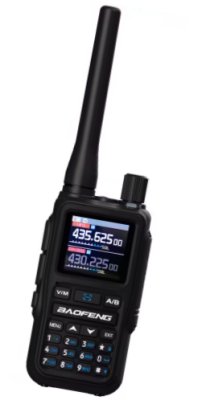
Our budget pick: Baofeng UV-5R Mini
If you’re looking for an inexpensive first handheld, we think the Baofeng UV-5R Mini is worth considering. It’s a compact 5W 2m/70cm handheld with a colour screen, USB-C charging and airband reception. It can also be programmed using CHIRP or wirelessly from a smartphone using Bluetooth, which makes setting up repeaters and memories considerably easier than on many older budget handhelds. We’ve bought and tested one ourselves, and for the money we think it offers a useful combination of features for someone looking for their first amateur radio. Check Baofeng UV-5R Mini prices on eBay Check Baofeng UV-5R Mini prices on AliExpress Read our full Baofeng UV-5R Mini review Essex Ham may earn a commission from qualifying purchases made through these links. |
What about a mobile VHF/UHF radio?
If you want more power and a better permanent station, a mobile-style radio is worth considering.
These normally offer considerably more transmit power than a handheld and have a larger display, better controls and an external microphone.
Although they’re called mobile radios, there’s nothing to stop you using one in the shack.
If you’re using one at home, remember that you’ll normally need a suitable 13.8V DC power supply.
The antenna matters more than many beginners expect
For 2m and 70cm, antenna height is particularly important.
VHF and UHF signals are largely line-of-sight, so getting your antenna higher and clear of surrounding buildings can make a huge difference.
For home use, many amateurs start with a dual-band vertical or 2m/70cm collinear mounted as high as practical.
These are often the white fibreglass “stick” antennas you see on amateur radio masts.
Don’t forget the coaxial cable either. Losses increase as frequency rises, so a long run of thin cheap coax can waste a surprising amount of your signal before it even reaches the antenna.
If your budget is limited, spending a little less on the radio and a little more on the antenna and coax can be a very sensible choice.
Should I buy an analogue or digital radio?
Traditional amateur VHF/UHF voice uses analogue FM, and there is still plenty of analogue activity.
There are also several digital voice systems in amateur radio:
- DMR
- D-Star
- Yaesu System Fusion / C4FM
These systems can link repeaters and hotspots using the Internet, allowing contacts well beyond the normal range of the radio.
If digital voice interests you, check what is actually used in your area before choosing a radio. Buying a D-Star radio doesn’t help much if all of your nearby digital activity is DMR.
Have a look at the repeaters around you and ask local amateurs what systems are active.
A radio for contacts around the UK and the world
If you want to make longer-distance contacts, then you’ll probably be looking at HF.
HF amateur bands include 80m, 40m, 20m, 15m and 10m, along with several others.
HF signals can be refracted by the ionosphere, allowing contacts over hundreds or thousands of miles – and sometimes around the world.
This is where amateur radio starts to feel very different from using a local VHF repeater.
What type of HF radio?
Most HF radios cover several amateur bands and commonly support:
- SSB voice
- CW / Morse
- AM
- Data modes such as FT8
Some also include:
- A built-in automatic antenna tuner
- USB computer connection
- Built-in sound card
- Spectrum display or waterfall
- VHF and UHF coverage
For a beginner, a built-in USB sound interface can be particularly useful if you think you may want to try FT8 or other computer data modes.
Do I need an expensive HF radio?
No.
There are expensive HF transceivers with large displays and lots of features, but you don’t need one of those to make worldwide contacts.
A modest second-hand HF radio and a simple wire antenna can provide years of enjoyment.
There’s also an increasing range of compact radios aimed at portable and QRP operation.
Before buying, think about whether you want a traditional home station or something small enough to take portable.
Choosing an HF antenna
Once again, the antenna is at least as important as the radio.
A simple HF antenna might be little more than a length of wire, but there are many different designs.
Common beginner antennas include:
- Dipoles
- Linked dipoles
- End-fed wires
- Vertical antennas
- Loops
- Multi-band trapped antennas
HF antennas can be physically large because of the longer wavelengths involved, so your available garden or mounting space may actually determine which bands you can use comfortably.
If you’ve got a small garden, don’t assume HF is impossible. There are plenty of compromise and shortened antennas available, although every antenna involves trade-offs.
Do I need an ATU?
An ATU – Antenna Tuning Unit – can help your transmitter see an acceptable impedance when using certain antennas.
You may also see this called an Antenna Matching Unit (AMU).
You don’t automatically need one.
If your antenna is already resonant on the band you’re using, an ATU may not be necessary at all.
Other antennas are deliberately designed to be used with a tuner.
Some modern HF radios have an automatic ATU built in, which is convenient, although built-in tuners normally only cope with a limited range of mismatch.
It’s worth deciding on your antenna before assuming that you need to spend money on a separate tuner.
Do I need an SWR meter?
An SWR indication is useful when setting up and checking antennas.
Many modern radios have an SWR meter built in, and many external ATUs do too.
If neither your radio nor tuner provides one, a separate SWR meter can be a useful addition to the shack.
Don’t forget the power supply
Many amateur radio transceivers are designed to operate from around 13.8 volts DC.
If the radio doesn’t come with a mains power supply, you’ll need to buy one that’s capable of providing enough current for the radio at full transmit power.
Don’t choose a power supply purely by voltage. Check the radio manufacturer’s current requirement as well.
A 100-watt HF transceiver, for example, may require well over 20 amps when transmitting.
What about an all-in-one radio?
There are radios sometimes described as “shack in a box” transceivers that cover HF, 6m, 2m and 70cm in one unit.
These can be attractive to a newly-licensed amateur because one radio provides access to a very wide range of the hobby.
Depending on the model, you may be able to use:
- Local VHF/UHF FM
- Repeaters
- VHF/UHF SSB
- HF worldwide contacts
- Data modes
- CW
- Satellite operation
The downside is that they can cost more than a basic single-purpose radio, and if the radio fails you’ve potentially lost your entire station.
Still, for somebody wanting to explore lots of different parts of amateur radio, they’re worth considering.
Do I need SDR?
Many modern amateur radios use Software Defined Radio (SDR) technology internally.
From the operator’s point of view, one obvious benefit is often a spectrum display or waterfall that lets you see activity across part of a band rather than simply tuning around and listening.
This can be very useful, but don’t make the mistake of thinking that you can’t enjoy amateur radio without a waterfall display.
A conventional radio with a tuning knob still works perfectly well.
What about FT8 and other data modes?
If modes such as FT8, FT4, PSK31, RTTY or SSTV appeal to you, consider how easily the radio can connect to a computer.
Some modern radios provide audio and CAT control over a single USB cable.
Older radios may require a separate sound interface and control lead.
Neither is necessarily better, but built-in USB connectivity makes getting started with data modes considerably easier.
Buying new or second-hand?
There’s nothing wrong with buying a second-hand amateur radio.
In fact, buying used equipment from another amateur can be an excellent way of getting a better-quality radio for your budget.
Before buying second-hand:
- Check that the radio transmits and receives correctly
- Check for damaged controls, displays and sockets
- Ask whether any modifications have been made
- Check that the microphone and power lead are included
- Find out whether programming software and drivers are still available
- Be cautious of equipment with an unknown history
Amateur radio rallies and local clubs can also be good places to find used equipment and get advice before buying.
Should I buy a cheap imported radio?
Cheap radios have made amateur radio much more accessible, particularly on VHF and UHF.
They can be perfectly adequate for getting started, but there are compromises.
Compared with more expensive radios, you may find differences in:
- Receiver performance
- Build quality
- Filtering
- Ease of programming
- Documentation
- Dealer and manufacturer support
That doesn’t mean you shouldn’t buy one. Plenty of amateurs start with an inexpensive handheld and have great fun with it.
Just don’t assume that the cheapest radio is automatically the best value for what you want to do.
Think about your licence progression
UK Foundation licensees can currently use up to 25 watts PEP on many commonly-used amateur bands, subject to the individual limits shown in the licence.
That doesn’t mean you need to buy a special 25-watt radio.
Most commercially-available HF and VHF/UHF radios are capable of considerably more power, and the operator simply reduces the output to remain within their licence conditions.
If you’re planning to progress to Intermediate or Full, buying a radio capable of higher power can make sense because you won’t necessarily need to replace it when your permitted power increases.
Always operate within the limits of your current licence.
What would we suggest for a newly-licensed amateur?
There isn’t one right answer, but we’d generally suggest not rushing out and buying everything at once.
If you’re mainly interested in local radio, a dual-band 2m/70cm handheld is a cheap way of getting started. See what activity is like locally, try some repeaters and learn what interests you.
If HF is what attracted you to amateur radio in the first place, it may make more sense to put your money towards an HF radio and a decent antenna rather than buying several handhelds that you don’t really need.
And if you still aren’t sure, talk to other amateurs before buying. Most will be very happy to tell you what they use – sometimes at considerable length!
Before you buy – our checklist
- What bands do I actually want to use?
- Do I want local contacts, worldwide contacts, or both?
- Can I install a suitable antenna?
- Will I operate at home, mobile or portable?
- Do I want analogue or digital voice?
- Will I want to use FT8 or other computer modes?
- Does the radio need a separate power supply?
- Does it have a built-in ATU?
- What accessories will I need?
- Will it still suit me if I progress to Intermediate or Full?
Still need advice?
Ask in the Essex Ham forum, Facebook discussion group or Groups.io chat and give as much information as possible about:
- Your licence level
- Your budget
- Your location
- The type of antenna you can install
- Whether you’re interested in local, HF, digital or portable operation
See www.essexham.co.uk/help for the different ways Essex Ham members can help.
Hopefully this guide has given you a better idea of what to look for. If you’ve got any tips for somebody choosing their first amateur radio, please add them as a comment below.
Related Links
- Just got your licence? Next Steps…
- Buying radios from eBay – some advice on how to shop carefully
- Essex Ham’s Getting Started Guides
- Setting Up Your First Station
- Getting Started with Repeaters
- Need help connecting a handheld to a PC for programming?
- Guide to using the Baofeng UV-5R

Hi I am going to be doing my foundation at some point, I would like to buy a HF basestation with built in SWR & ATU and supports higher power for when I move on, there are so many it baffles me, could someone please just recomend a make and model that includes these items.
fantastic and informative site btw
Many Thanks
James
Hi James
You could try the Chung-Fung Ho Hee Hai Waah 2000, it covers all the bands and is £8.99 on Ali Express. You’re going to need an antenna such as the Cubic Zirconia X-75 (£2.50) and some decent Co-Ax like Golden Pearl City Kitchen RG8-Micro (20p per 1 Km from Knights Electrocom.co.uk.com). Don’t forget your PRC-Ah-So 39 connectors to connect both ends of your co-ax between the radio and antenna. Most importantly, have fun!