You’ve landed here as you’re looking for more information on Meshcore, from am anateur radio perspective. Hopefully, this short guide gives you the basics
What is Meshcore?
Meshcore is essentially a community-built digital network where each node talks to the others and passes traffic along, rather like a modern packet network but designed to be simple and scalable. Think of it as creating your own small data backbone across a town or city, using low-power radio devices that automatically relay messages between themselves.
For a radio amateur, the idea is familiar in spirit. Each node acts a bit like a digipeater, forwarding traffic so it can reach further than a single hop. The difference is that routing happens automatically and dynamically — if one path drops out, the data finds another way. There’s no central controller.
In practice, Meshcore can be used for local messaging, telemetry, sensor data or linking community projects. It’s particularly attractive as a resilient backup layer if the internet or mobile networks fail. For hams, it combines RF experimentation with practical networking, encouraging good siting, antenna work and cooperative coverage planning.
Getting started with Meshcore
Meshcore runs on low-power radio hardware, typically in licence-exempt ISM bands such as 868 MHz in the UK. Devices are cheap and broadcast small packets, which are picked up by neighbouring nodes. Those nodes then repeat the packets onwards if needed. Over time, a web of interconnected radios forms a “mesh”. Think of it as a digital evolution of packet radio digipeating. Instead of fixed paths, the routing adapts automatically. You don’t have to manually configure every hop.
In a city, that means you can gradually build coverage by adding nodes on rooftops, in lofts, on balconies or in community buildings. Each new node strengthens the overall network.
A popular starting point is hardware from Heltec. Their LoRa development boards combine:
- An ESP32 microcontroller
- A LoRa radio module
- USB interface for programming
- Often a small OLED display
- Integrated antenna connector (usually IPEX or SMA depending on model)
These boards are inexpensive, widely available, and well supported. For a beginner, that matters. You can buy one, plug it into your PC via USB, flash the firmware and be on air quickly.
Start with two boards if possible. That way, you can test point-to-point before trying to join or build a wider mesh.
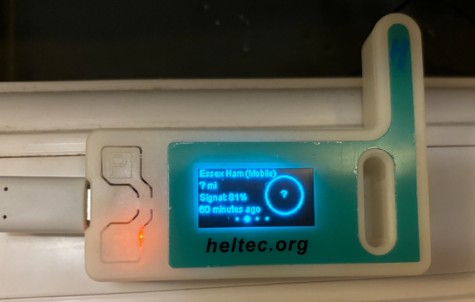
Once you have the hardware, the next step is Flashing the Meshcore Firmware
Most Meshcore-compatible devices are flashed via USB.
The general process:
-
- Install the required USB drivers (if needed) – Make sure your PC has the Silicon Labs CP210x USB driver installed – Check Windows Device Manager. Install the latest from Windows Update (under Advanced Drivers)
- Download the Meshcore firmware appropriate for your board. Use the web-based Flasher – https://flasher.meshcore.dev/
- Select the correct COM port.
- Upload the firmware.
- Reboot the board.
Within minutes, the device should power up and begin broadcasting beacons.
What you’re likely to get depends on what Meshcore nodes are near you. As with amateur radio, antenna type and placement makes all the difference. Pay attention to obstacles (brick walls, metal cladding, double glazing), and height is might. A node on a windowsill upstairs will outperform one at ground level behind thick walls. Heltec boards often ship with small whip antennas. They work, but performance improves with better antennas. Options include:
- Tuned quarter-wave verticals.
- External 868 MHz fibreglass antennas.
- Small collinears for rooftop mounting.
- If your board has an IPEX connector, you may need an adapter to SMA. Keep feeder runs short to reduce losses. At 868 MHz, coax quality matters.
Best locations: Loft spaces, upstairs windows facing open areas, roof-mounted weatherproof boxes, high shelves away from wiring clutter. Urban propagation at 868 MHz is often better than expected, but concrete and steel will reduce range sharply.
If several local amateurs participate, you can map coverage and fill gaps strategically.
Common Meshcore uses include:
- Short text messaging between nodes.
- Event coordination.
- Community alerts.
- Sensor telemetry (weather, river level, temperature).
- Simple GPS tracking.
- Emergency preparedness.
- Public events.
- Amateur experimentation projects.
- STEM outreach and demonstrations of radio tech.
UK Meshcore Settings
- EU/UK (Narrow)
- Frequency: 869.618MHz
- Bandwidth: 62.5 kHz
- Spreading Factor 8
- Coding Rate: 8
- Transmit Power: 22dBm
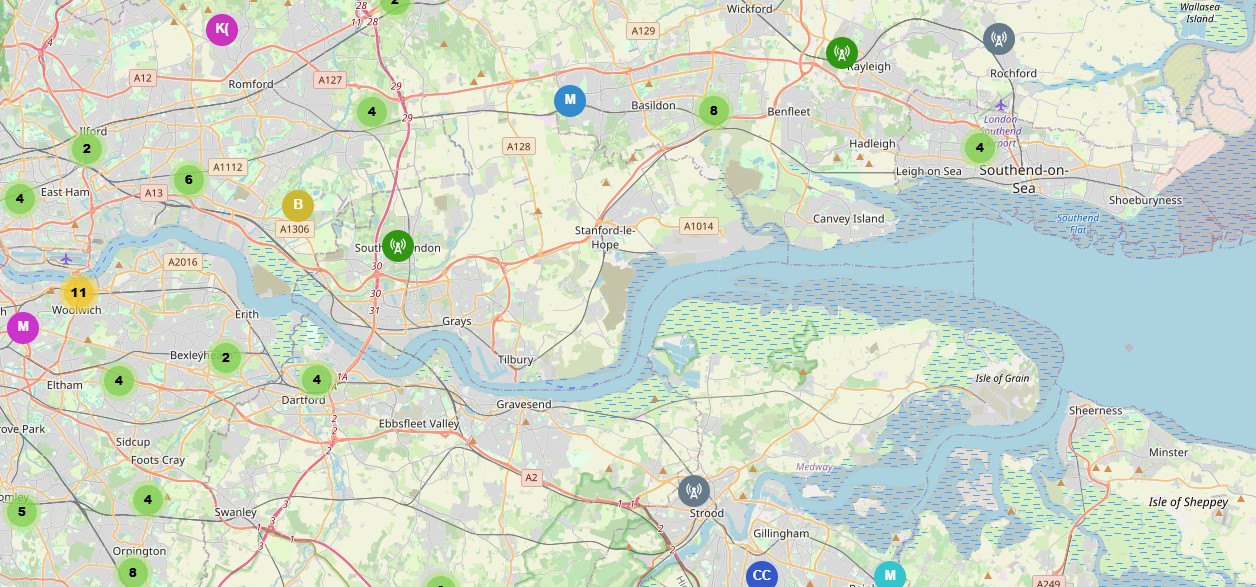
Essex Meshcore Map
Early days for Essex, but here is a snap of the Meshcore activity as of 01 March 2026 (Source: Meshcore Map) – click for larger image:
| Looking for Meshcore kit?
A common place to look is AliExpress – See: Lora at AliExpress. The Heltec v3 is now available on Amazon: Heltec v3 at Amazon A popular choice is kit based on the Lora 32 ESP32 development board. We ordered a Heltec board (supplied with a snazzy case) from the following dealer: Lora32 V3 ESP32-S3 868MHz at AliExpress – We ordered a pack of two and they turned up in under a week. Note that this requires external power, and flashing with the MeshCore software, which is pretty straightforward. |
Related Links
- Essex Meshcore and Meshtastic Forum
- Meshcore or Meshtastic?
- What is Meshtastic – Essex Ham’s Guide
- Meshcore for Southend-on-Sea
- EssexMesh – Community site for Meshcore in Essex