

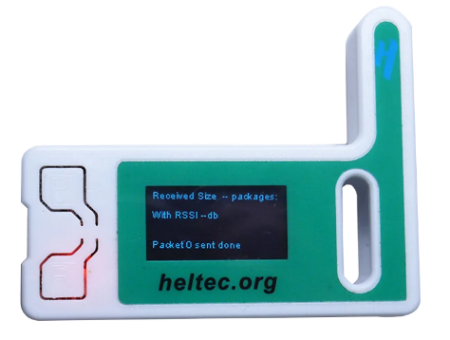
Meshtastic and MeshCore have a lot in common. Both use inexpensive LoRa radio hardware to send short messages over radio without relying on mobile phone coverage or the Internet, and both have attracted considerable interest from radio enthusiasts.
I originally got quite excited about Meshtastic. Unfortunately, my enthusiasm faded because here in Southend-on-Sea I didn’t manage to send or receive very many messages. More recently I’ve switched my attention to MeshCore, which uses much of the same hardware but takes a rather different approach to building a network.
MeshCore vs Meshtastic
Both systems can provide off-grid text messaging over LoRa, but the biggest difference is how they build and extend their networks.
- Meshtastic is designed around a relatively decentralised mesh. Compatible user nodes can help relay messages across the network, with managed flooding and routing techniques used to get messages to their destination. It has a large established community, broad hardware support and useful features including messaging, position sharing, telemetry and optional Internet/MQTT integration.
- MeshCore makes a clearer distinction between users and infrastructure. A normal Companion device is primarily your personal radio and doesn’t normally relay everybody else’s traffic. Dedicated Repeaters are placed in useful locations to extend the network, while Room Servers can provide shared message rooms and store messages for later retrieval.
That makes MeshCore particularly interesting for communities that want to build a more deliberately planned local or regional radio network, with repeaters installed at good locations rather than relying entirely on users’ handheld devices to extend coverage.
Neither approach is automatically better. Meshtastic can make a lot of sense for an ad-hoc group of users, particularly where there is already an active Meshtastic community. MeshCore becomes particularly attractive where people are prepared to build dedicated repeater infrastructure.
Can I use the same hardware?
In many cases, yes. Popular LoRa boards such as the Heltec LoRa 32 V3 can run either Meshtastic or MeshCore firmware.
The two systems are not compatible over the air, however. A device running MeshCore can’t exchange normal messages with a Meshtastic device. To move a compatible device from one system to the other, you re-flash it with the appropriate firmware.
My experience in Essex
My original experiments with Meshtastic around Southend-on-Sea were interesting, but I struggled to find enough useful network activity to keep me interested.
MeshCore has been a rather different experience. The dedicated-repeater approach particularly appeals to me from an amateur-radio background: put infrastructure at sensible locations, establish useful coverage and allow users’ portable devices to make use of it.
We’re now experimenting with MeshCore around Essex, looking at coverage, repeaters and ways of making the network genuinely useful rather than simply collecting nodes on a map.
We’ve set up an Essex MeshCore section with information for people interested in joining or helping to expand the network.
Find out more about MeshCore in Essex »
Changing a Heltec V3 from Meshtastic to MeshCore
If you already have a compatible Heltec V3 running Meshtastic, moving it to MeshCore is straightforward.
- Connect the Heltec V3 to your computer using USB.
- Make sure the required Silicon Labs CP210x USB driver is installed if your computer doesn’t recognise the board.
- Open the MeshCore web flasher in a compatible browser.
- Select the appropriate Heltec V3 firmware and follow the flashing instructions.
MeshCore Web Flasher: flasher.meshcore.dev
MeshCore settings we’re using in Essex
For our local Essex experiments, we’re using the EU/UK Narrow configuration:
- Preset: EU/UK (Narrow)
- Frequency: 869.618 MHz
- Bandwidth: 62.5 kHz
- Spreading Factor: 8
- Coding Rate: 8
- Transmit Power: 22 dBm
If you want to participate in the Essex network, using the same radio parameters is important. Nodes using different frequencies or LoRa settings won’t be able to communicate directly with each other.
| Looking for MeshCore kit?A common place to look is AliExpress: LoRa equipment at AliExpress.
The Heltec V3 is also available from Amazon: Heltec V3 at Amazon. A popular starting point is a LoRa 32 ESP32 development board. We ordered a Heltec board with a case from AliExpress: LoRa32 V3 ESP32-S3 868MHz at AliExpress. We ordered a pack of two and they arrived in under a week. The boards require external power and need to be flashed with the appropriate MeshCore firmware. |
Which should I choose?
If there’s already an active Meshtastic network where you live, Meshtastic remains an obvious choice. It has a large community, broad hardware support and a mature ecosystem.
If you’re interested in building a more structured local network using strategically placed repeaters, or there’s already an active MeshCore network nearby, MeshCore is well worth investigating.
For us in Essex, MeshCore is currently proving the more interesting of the two.
Links
Anything to add? Please add a comment below.

Hi, it would be good if you could leave a link for the silicone labs CP210X usb Driver
mentioned in the page regarding ” Meshcore or Meshastic”
i think i found the right one with difficulty. so would be easier if you could put a direct link
many thanks dave d
Hi Dave
Could you post the link to the one you found?
Thanks
Alaistair
I live in the northwest UK, towards Preston. I found Meshtastic was useful and I made contacts and passed a few messages. Excited by Meshcore I set up a repeater but got almost no traffic. in six moths of running the repeater I effectively made one contact.