


In amateur radio, the Q code QRZ? means “Who is calling me?” It’s also the name of QRZ.com, one of the world’s most widely used amateur radio callsign databases.
If you hear a callsign on the air, entering it into QRZ.com can often tell you who the operator is, where they’re located and whatever other information they’ve chosen to share.
Many radio amateurs in the UK and around the world have a QRZ entry. QRZ also offers features including an online logbook, awards and callsign information used by various logging applications.
Setting up a QRZ.com account and getting a UK callsign listed isn’t quite as obvious as you might expect, so here’s a quick guide to getting started.
What is QRZ.com?
Think of QRZ as something of a phone book for radio amateurs. Search for a callsign and, if the operator has an entry, you can usually find some basic information about them.
Some people provide little more than their name and general location, while others create detailed pages containing information about their station, radios, antennas, photographs, previous callsigns and other interests. How much information you choose to share is up to you.
QRZ data is also used by various amateur radio logging applications to look up callsigns and automatically populate information about a contact.
To see an example, take a look at my entry: M0PSX on QRZ.com.
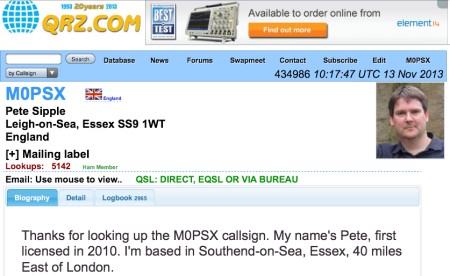
An example of a typical entry on QRZ.com
How to add a UK callsign to QRZ.com
Getting a basic QRZ entry is free. For UK amateurs and other non-US callsigns, the process normally involves creating a QRZ account and then requesting that your callsign is added to the database.
Step 1 – Create your QRZ account
- Go to QRZ.com and create an account.
- Follow the instructions to confirm your account and email address.
- Once your account is working, visit the QRZ Add My Call Sign forum.
- Read the current instructions in the forum before posting your request. QRZ will explain what information is required to add your callsign to the database.
- Post your request and wait for one of the QRZ Database Helpers to process it.
The process is handled by QRZ volunteers, so don’t worry if your callsign doesn’t appear immediately.
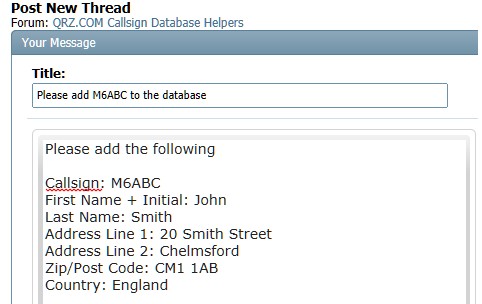
Requesting that your callsign is added to the QRZ database
Step 2 – Set up your QRZ.com entry
Once your callsign has been added to the QRZ database, log in to QRZ and open the page for your callsign.
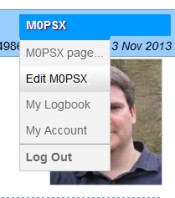
- Go to QRZ.com and log in.
- Open the QRZ page for your own callsign.
- Use the edit/update option for your callsign.
- Add or update the information you want associated with your entry.
- You can also add a biography and photographs if you wish.
QRZ changes its menus from time to time, so the precise wording and position of the editing options may differ slightly from the screenshots on this page.
How do I edit my QRZ biography?
Once your callsign entry is established, you can add information about yourself and your amateur radio station.
- Log in to QRZ with your username and password.
- Go to the QRZ page for your callsign.
- Select the option to edit or update your callsign.
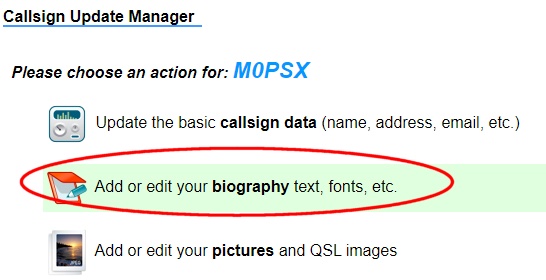
- Select the option to add or edit your biography.
QRZ.com and your personal data
You don’t have to put your entire life story onto QRZ. As with any third-party website, it’s worth thinking about how much personal information you’re comfortable making publicly available.
You can keep your entry fairly basic or add considerably more information about yourself and your station. Consider carefully before publishing information such as your full address, personal contact details or anything else that you’d prefer not to be publicly searchable.
Just got your callsign?
If you’ve recently passed your amateur radio exam and received your first callsign, setting up QRZ is just one of the things you may want to do next.
Our Getting Started guides cover some of the practical things that new radio amateurs often need help with, including getting on the air, using repeaters, choosing equipment and making your first contacts.
| Newly licensed? See our Getting Started Guides » |
More QRZ questions?
If you’ve got a question about getting started with QRZ.com, please add a comment below.

haloooooooo
It’s amazing how many hams post their full name, address and email address on QRZ.com Huge potential there for id theft. Personally, I wouldn’t touch it with a bargepole.
And equipment theft. It’s just a massive database of addresses for the best in society to go and burgle. I genuinely think anyone who knowingly puts their name and address on QRZ is an idiot.
Hi all.
I started the eegistration process for my callsign 5 days ago. I asked the helper staff if there is a problem regarding my callsign, and they said that I have to be patient. All I see is that people get the callsign entered into the database who aked for registration days after me. I give it 1 more day, then I am done with QRZ.COM.
I got my registered data base within a couple of hours on QRZ, Also thanks Pete.
Hi Pete,
I assume users can chose what info is displayed to others? Can you hide full address etc?…
Cheers,
Manny – M7EPB
can anyone tell me how to bring up an alert ive recieved on my qrz page , its dissapeared ! cheers
good evening from birmingham uk came across your website today, im currently an swl and collect qsl card’s but received email from qrz.com that they don’t cater for swl’s, is there any other way of obtaining adresses etc of hams to send rpts to to receive back qsl card? my radio “tecsun pl-660+15 mtr long sky wire up at 12 mtrs agl, sometimes hrd on the 20 mtr band in ssb often at s7-s8 station from shanghai the prc, yl student nurse, english spoken well no wonder she has big big pile ups!!!
Join WRL RADIO it’s free
Personally, I prefer Hamcall UK. Much more detail can be added.
“” Most licensed hams around the world have an entry in QRZ”
I dont think so. I’d be surprised if its much over 50%. I personally could list a number of amateur ops who choose not to be registered on QRZ. Probably the main reason is privacy as its not based in the UK.
Given the consequences of obtaining personal information anyone listing their address publi-ally is taking a big risk
i
“”Most licensed hams around the world have an entry in QRZ””
No thats simply not true!
Outside of the US its very spotty as to whether a callsign is on QRZ.com. Some are but many are not..
Its really up to an individual if they want their call on or not. So if a callsign is not listed that does not mean its not a valid callsign
Hello,
How secure is QRZ.com? I am struggling with the first hurdle I.e. enter your …..and address on the forum.
Thanks 73
I dont know how secure QRZ.com is from a data point of view.
However, I wouldnt touch it as its a US based server that somehow thinks it the authority of amateur radio validity. And indeed some US hams have fallen for the trap of thinking “if a callsign is not on QRZ it not valid”. The reality is that outside of the US many amateurs choose not to list themselves on QRZ. Its misleading and rather irresponsible for EssexHam to suggest that its the most important thing to do.
The other thing is that QRZ exhibit a fair ammount of attitude when questioned about anything. So I’d advise to keep clear of it.
You wont be alone in an international context!
Thanks for the feedback, and I totally understand that you have concerns about sharing details with others online.
We’ll have to agree to disagree on whether it’s misleading to say that there’s a fair number of people out there, certainly in the UK and US, who put their details up on QRZ. From experience, it’s rare to find someone in the UK who’s not on QRZ, but of course people can make up their own minds, and if, after reading our guide, you’ve decided QRZ is not for you, that’s fine.
I doubt very many people would be swayed to change their views on online security by reading our page on QRZ, but I’ve added a few caviats if you genuinely believe people can’t make up their own minds about using QRZ.
It’s of course work mentioning that it’s up to users of services like QRZ how much information is published. Whilst I wouldn’t recommend putting a full home address on there with a list of valuables and holiday dates, I doubt Name=”Garry” and Country=”Wales” presents much of a security risk.
Again, thanks for your feedback and opinion.
“Setting yourself up on QRZ is probably one of the first things that most new amateurs do once they’ve got their callsign””
I think you are being a bit irresponsible in writing this. Furthermore you are reinforcing a misguided belief exhibited by a small number of hams (mainly in the US) who seem to believe that if someone is not listed on QRZ then its not a valid callsign.
QRZ has become a somewhat controversial entity. Mostly for the reasons stated above and having an attitude that they are somehow the gold standard of callsign validity. As we all know listing on QRX is entirely voluntary for hams outside of the US.
Other problems with QRZ include data protection and an unwillingness to answer questions about when asked. Personally I experienced a very negative and surely attitude when I asked them some questions.
And finally one particular aspect of QRZ really got to me. As we all know one of the great things about amateur radio is that it brings people from different countries together and keeps politics out of it. However, after the Russian invasion of Ukraine QRZ banned the listing of Russian callsigns for a while. Much as I dislike the current Russian regime I in no way hold anything against Russian amateurs individually. This was despicable on the part of QRZ.
I with all the other comments here and intend to stay well clear of QRZ!
I don’t get how this is irresponsible. Regardless of your personal views of QRZ, which I fully respect, this page offers a “how to” for those who want to sign up to QRZ. We’re not forcing people to sign up, and we’re not stating that it’s compulsary.
A quick check shows that there are around 6,000 UK M7 callsigns registered, on QRZ (not counting those who’ve progressed to a different callsign), so that’s a strong percentage.
Privacy is a concern, of course, and QRZ allows people to put as much or as little as they wish. M7AAA, first on the list, is a great example. His entry is “Thomas M”, location “York”. That’s enough to be useful for a QSO lookup, but that’s minimal data, and the idea that that would be of use to a burglar or fraudster is laughable.
Clearly, a significant number of people are happy to sign up to QRZ, and some of them value a page like this that shows them how to get started.
For those not keen on QRZ, this isn’t the page for you, and there are plenty of less-popular alternatives out there if QRZ’s not for you.