

Skip to content
  • Facebook
  • YouTube
  • Bluesky
  • Discord
  • X
  • Instagram
  • RSS
Essex Ham Logo

Essex Ham

Supporting Amateur Radio in Essex

Essex Ham's Foundation Online Course
  • Home
  • Get Started
    • What is Amateur Radio?
    • Become a Ham
    • Amateur Radio Explained
    • Guide for Parents
    • Amateur Radio Books
    • Common Questions
  • Advice
    • How to Become a Ham
    • Passed? Get Your Licence
    • Just Got Your Licence?
    • Your First Handheld
    • Your First Station
    • Getting Started Guides
    • Returning to the Hobby
    • Getting Started with Data
    • Downloads & Handouts
    • Your Questions (FAQ)
  • Events
    • Events Calendar
      • Calendar View
      • Poster View
      • Upcoming Field Events
      • Upcoming Training
      • Essex Field Events This Year
      • Upcoming Local Rallies
    • Next Essex Ham Events
    • Club Events List
    • Recent Events in Essex
    • Essex 2m Activity Days
    • Annual Event List
    • Latest News & Articles
  • Training
    • How to Get Started
    • Foundation Online Course
    • Training Courses in Essex
    • Other Online Courses
    • Training Videos
    • Foundation Exam Books
    • Training Material
    • Training Information
    • Essex Training Calendar
    • For Tutors
  • Clubs
    • Support for Clubs
    • Clubs in Essex
    • Resources & Downloads
    • Training Material
    • Promotional Videos
    • Essex Speakers Directory
  • About Us
    • What is Essex Ham?
    • Latest News & Articles
    • Forums
    • Videos
    • Internet Radio Stream
    • Podcast
    • Live Weather
    • Essex Ham APRS iGate
    • Essex Ham Newsletter
    • Essex Activity Map
    • About Our Site
  • Net
    • Monday Night Net Info
    • Monday Net Chatroom
    • Monday Net Reports
    • Live Audio Feed
    • Danbury Repeater GB3DA
    • Other Nets in Essex
    • Repeaters in Essex
  • Members
    • Join our Community
      • Join Essex Ham (free)
      • Essex Ham Members FAQ
    • Forums
    • Live Chatroom
    • Merchandise
    • Recommended Kit
    • Members-Only
      • Members-Only Area
      • Member Main Page
      • Email Alerts
      • Essex Ham Newsletter
      • Email Discussion Group
  • Forums / Contact Us
    • Forums
    • Email Discussion Group
    • Need some help?
    • Contact The Team
    • Our Facebook Group
    • Discussion Group List

What is SDR? Software Defined Radio for Beginners

What is an SDR?

SDR stands for Software Defined Radio.

In simple terms, an SDR uses software to do much of the work that would traditionally have been handled by hardware inside a radio.

A typical SDR setup consists of:

  • A small radio receiver or USB dongle
  • An antenna
  • A computer, tablet or other device
  • SDR software showing signals and allowing you to tune them

One of the biggest advantages is that you can often see a large chunk of spectrum on-screen at once, rather than tuning around one frequency at a time.

This makes SDR particularly useful for amateur radio, scanning, short-wave listening, aircraft reception, satellites and general radio experimentation.

What does SDR software show you?

Most SDR programs display two useful views:

  • Spectrum display – shows signals across a range of frequencies
  • Waterfall display – shows how signals appear and disappear over time

A strong transmission normally appears as a visible peak on the spectrum and a bright trace on the waterfall.

This means you can often spot activity visually before you’ve even tuned to it.

What can you listen to with an SDR?

That depends on the frequency coverage of the particular SDR and your antenna, but possible uses include:

  • Amateur radio on VHF and UHF
  • HF amateur radio and short-wave broadcasts
  • FM broadcast radio
  • Airband
  • Marine radio
  • Weather satellites
  • Amateur radio satellites
  • ADS-B aircraft transmissions
  • Digital modes
  • Radio beacons and telemetry

Not every SDR covers every frequency range, so always check the specification before buying.

Cheap USB SDR dongles

One of the reasons SDR has become so popular is that getting started can be very inexpensive.

USB receivers based on the RTL-SDR concept can provide wide frequency coverage for relatively little money and are a good way of experimenting with software-defined radio.

They’re particularly popular for VHF and UHF reception, scanning, aircraft signals and satellite work.

Some models can also receive HF directly, while others require additional hardware or a different SDR designed for HF.

Better-quality SDR receivers

If you want better receiver performance, there are more capable SDRs available from manufacturers such as Airspy and SDRplay.

Higher-performance receivers generally offer improvements such as:

  • Better dynamic range
  • Improved filtering
  • Lower noise
  • Better resistance to strong nearby signals
  • Wider usable bandwidth

These differences become more important if you live somewhere with strong broadcast transmitters nearby or if you’re trying to receive weak amateur radio signals.

Popular SDR software

There are several SDR programs available, and the best one depends partly on your operating system and hardware.

Popular choices include:

  • SDR# (SDRSharp) – widely used on Windows
  • SDR-Console
  • HDSDR
  • GQRX – popular with Linux and Mac users

Modern SDR software normally lets you select the receiver mode, bandwidth, filtering, gain and other settings from the computer screen.

SDR# downloads and information »

Do you need an amateur radio licence to use an SDR?

No, not for receiving.

An SDR receiver can be used purely as a listening device, so it’s a useful way of exploring radio before getting an amateur radio licence.

If you want to transmit on amateur frequencies, you’ll need the appropriate amateur radio licence and transmitting equipment.

Can an SDR transmit?

Some SDR devices are receive-only, while others are transceivers that can both receive and transmit.

Examples of transmit-capable SDR systems include specialist amateur radio transceivers and experimental platforms such as HackRF and LimeSDR.

For beginners, however, a simple receive-only SDR is usually the easiest and cheapest place to start.

The antenna still matters

As with any radio receiver, the SDR itself is only part of the system.

A good antenna can make a much bigger difference than changing software.

The ideal antenna depends on what you want to receive:

  • A simple VHF/UHF antenna for local amateur radio
  • An airband antenna for aircraft
  • A long wire or loop for HF
  • A directional antenna for satellites

One antenna won’t necessarily perform well across the SDR’s entire frequency range.

Watch out for overload

One common beginner mistake is assuming that more gain is always better.

It isn’t.

If the gain is set too high, strong local signals can overload the receiver and produce false signals or make weaker stations harder to hear.

Start with moderate gain and increase it only until the wanted signals improve.

This is particularly important with inexpensive wideband SDR dongles.

Using an SDR remotely

Another useful feature of software-defined radio is that the receiver doesn’t necessarily have to be next to you.

Some SDR software can make a receiver available across a local network or over the Internet.

This means you could place an SDR somewhere with a better antenna and access it remotely from another computer.

Airspy’s SPY Server, for example, supports remote use of several SDR receiver types across a network.

Try SDR without buying anything

You can even experiment with software-defined radio before buying your own receiver.

There are publicly-accessible SDR receivers around the world that can be controlled through a web browser.

These are often known as WebSDR or remote SDR receivers.

They’re a good way of exploring HF bands, listening to amateur activity and learning what a waterfall display looks like.

Our early SDR experiments – the G0NQE Acorn SDR

Our first experiments with software-defined radio go back many years.

Many thanks to David Ingrey M0HBV for the loan of his SDR, featured here.

David built this receiver himself from a kit. It was the G0NQE Acorn SDR, sold at the time by Kanga Products for £19.95.

The Acorn was a single-sideband receiver covering the 80 metre amateur band around 3.5MHz.

Unlike today’s tiny USB SDR dongles, this was a traditional kit using standard through-hole components, making it suitable for someone comfortable with a soldering iron.
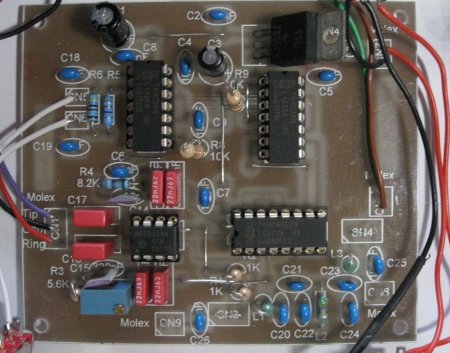
Fully constructed G0NQE Acorn SDR receiver

Fully constructed G0NQE Acorn SDR

How the Acorn SDR worked

The Acorn produced an audio-frequency output that was connected to the sound input of a computer.

The computer’s sound card then digitised the signal, and SDR software performed the tuning and demodulation.

This was a common approach with early amateur SDR designs.

The bandwidth visible on-screen depended largely on the capabilities of the sound card. With a 96kHz sound-card sample rate, for example, you could see a useful portion of the 80 metre band at once.

Our early SDR software

We tried a couple of SDR applications with the Acorn.

The first was M0KGK’s SDR software, which handled the audio from the Acorn and displayed activity across the band.
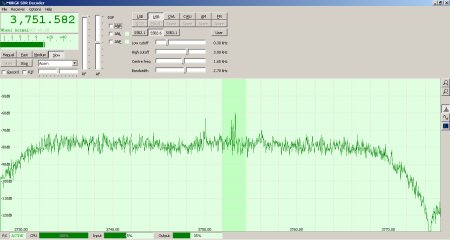
G0NQE Acorn SDR displayed using M0KGK SDR software

Acorn SDR output displayed using M0KGK SDR software

We also tried Winrad, which offered more controls and a waterfall display that made strong signals very easy to spot.
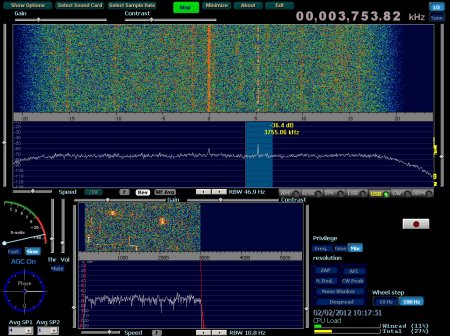
G0NQE Acorn SDR displayed using Winrad software

Acorn SDR output displayed using Winrad

Software and SDR hardware have moved on considerably since those early experiments, but the basic principle remains the same: the radio hardware captures part of the spectrum and software lets you see, tune and process the signals.

Is SDR worth trying?

Definitely.

SDR is one of the cheapest ways to explore a large amount of radio technology.

With one small receiver you can experiment with:

  • Amateur radio
  • Scanning
  • Digital signal decoding
  • Aircraft tracking
  • Satellite reception
  • Short-wave listening
  • Antenna experimentation

And because you can actually see signals on the spectrum display, SDR is also an excellent way of understanding concepts such as bandwidth, modulation, noise and interference.

New to amateur radio?

You don’t need an amateur radio licence just to experiment with an SDR receiver.

If listening gets you interested in making your own transmissions, the UK Foundation licence is the normal starting point.

Essex Ham offers a FREE online Foundation training course to help you get licensed.

Want more beginner guides? See our Getting Started Guides

Thanks again to David M0HBV for the loan of the Acorn SDR that helped us explore software-defined radio all those years ago.

Comment (1) on “What is SDR? Software Defined Radio for Beginners”

  1. Bob Towers says:
    12 December 2013 at 14:05

    No SMD – great!

    What possibilities for using a 9850 based DDS VFO with this kit instead of the xtal VFO?

    73

    Bob
    MM0RKT

    Reply

Leave a Reply Cancel reply

Your email address will not be published. Required fields are marked *


Essex Ham Member Login

Forgot?  Register
More on MeshCore

Essex Ham Newslettter:

Looking for general updates on amateur radio? Join our free newsletter:

Recent Essex Ham Posts

  • Monday Night Net – AI Summary 17 Nov 2025
  • Monday Night Net – AI Summary 10 Nov 2025
  • Monday Night Net – AI Summary 03 Nov 2025
  • Monday Night Net – AI Summary 27 Oct 2025

Recent Forum Topics

  • Recommendations (especially antenna installers) by M7VSX
    3 days, 15 hours ago
  • Call-sign change by radioman
    1 week, 2 days ago
  • Hello Everyone by RonR
    2 weeks, 1 day ago

Callsign:

Upcoming Local Events

  • National Hamfest on 25 September 2026 09:30
  • CARS: Monthly Club Night Placeholder on 6 October 2026 19:30
  • SEARS: Monthly Club Night Placeholder on 8 October 2026 19:30
  • RSGB Convention 2026 on 10 October 2026 09:00
Essex Ham recommends:

Realtek USB SDR

  • Getting started? Baofeng UV-5R 2m/70cm handheld: £30
  • Listen to the bands on your computer: USB Software Defined Radio Dongle: £10 (More)
  • MeshCore Networking: Meshcore Heltec V3 (More)

Heltec v3 Meshcore
More Recommendations

Recent Comments

  • jonathan on Licence Changes – Ofcom Statement December 2023
  • jonathan on Licence Changes – Ofcom Statement December 2023
  • jonathan on Licence Changes – Ofcom Statement December 2023

Show Your Support for Essex Ham

Free Training. Free Content. Free Help. No Membership Fees. Want to say thanks? PayPal or Coffee donations are always appreciated.
Make a donation

Copyright © 2011-2026 Essex Ham. Home | About This Site | Site Terms & Privacy | GDPR Statement

Powered by PressBook WordPress theme

This site uses cookies to enhance your browsing experience, serve personalised ads or content, and analyze our traffic. By clicking “Accept All”, you consent to our use of cookies, however you can select "Cookie Settings" to control your consent. View Terms & Privacy Policy
Cookie SettingsAccept All
Manage consent

Privacy Overview

This website uses cookies to improve your experience while you navigate through the website. Out of these, the cookies that are categorized as necessary are stored on your browser as they are essential for the working of basic functionalities of the website. We also use third-party cookies that help us analyze and understand how you use this website. These cookies will be stored in your browser only with your consent. You also have the option to opt-out of these cookies. But opting out of some of these cookies may affect your browsing experience.
Necessary
Always Enabled
Necessary cookies are absolutely essential for the website to function properly. These cookies ensure basic functionalities and security features of the website, anonymously.
CookieDurationDescription
apbct_cookies_testsessionCleanTalk sets this cookie to prevent spam on comments and forms and act as a complete anti-spam solution and firewall for the site.
apbct_headlesssessionCleantalk set this cookie to detect spam and improve the website's security.
apbct_page_hitssessionCleanTalk sets this cookie to prevent spam on comments and forms and act as a complete anti-spam solution and firewall for the site.
apbct_prev_referersessionFunctional cookie placed by CleanTalk Spam Protect to store referring IDs and prevent unauthorized spam from being sent from the website.
apbct_site_landing_tssessionCleanTalk sets this cookie to prevent spam on comments and forms and act as a complete anti-spam solution and firewall for the site.
apbct_site_referer3 daysThis cookie is placed by CleanTalk Spam Protect to prevent spam and to store the referrer page address which led the user to the website.
apbct_timestampsessionCleanTalk sets this cookie to prevent spam on comments and forms and act as a complete anti-spam solution and firewall for the site.
apbct_urls3 daysThis cookie is placed by CleanTalk Spam Protect to prevent spam and to store the addresses (urls) visited on the website.
cookielawinfo-checkbox-advertisement1 yearSet by the GDPR Cookie Consent plugin, this cookie is used to record the user consent for the cookies in the "Advertisement" category .
cookielawinfo-checkbox-analytics11 monthsThis cookie is set by GDPR Cookie Consent plugin. The cookie is used to store the user consent for the cookies in the category "Analytics".
cookielawinfo-checkbox-functional11 monthsThe cookie is set by GDPR cookie consent to record the user consent for the cookies in the category "Functional".
cookielawinfo-checkbox-necessary11 monthsThis cookie is set by GDPR Cookie Consent plugin. The cookies is used to store the user consent for the cookies in the category "Necessary".
cookielawinfo-checkbox-others11 monthsThis cookie is set by GDPR Cookie Consent plugin. The cookie is used to store the user consent for the cookies in the category "Other.
cookielawinfo-checkbox-performance11 monthsThis cookie is set by GDPR Cookie Consent plugin. The cookie is used to store the user consent for the cookies in the category "Performance".
CookieLawInfoConsent1 yearRecords the default button state of the corresponding category & the status of CCPA. It works only in coordination with the primary cookie.
ct_checkjssessionCleanTalk–Used to prevent spam on our comments and forms and acts as a complete anti-spam solution and firewall for this site.
ct_fkp_timestampsessionCleanTalk sets this cookie to prevent spam on the site's comments/forms, and to act as a complete anti-spam solution and firewall for the site.
ct_has_scrolledsessionCleanTalk sets this cookie to store dynamic variables from the browser.
ct_pointer_datasessionCleanTalk sets this cookie to prevent spam on the site's comments/forms, and to act as a complete anti-spam solution and firewall for the site.
ct_ps_timestampsessionCleanTalk sets this cookie to prevent spam on the site's comments/forms, and to act as a complete anti-spam solution and firewall for the site.
ct_sfw_pass_key1 monthCleanTalk sets this cookie to prevent spam on comments and forms and act as a complete anti-spam solution and firewall for the site.
ct_timezonesessionCleanTalk–Used to prevent spam on our comments and forms and acts as a complete anti-spam solution and firewall for this site.
sessionIdsessionThis cookie, set by Microsoft, is used by the website to store the user's session ID and is sent with each request to the ASP.NET application.
viewed_cookie_policy11 monthsThe cookie is set by the GDPR Cookie Consent plugin and is used to store whether or not user has consented to the use of cookies. It does not store any personal data.
Functional
Functional cookies help to perform certain functionalities like sharing the content of the website on social media platforms, collect feedbacks, and other third-party features.
CookieDurationDescription
apbct_pixel_urlsessionCleanTalk set this cookie to provide spam protection.
__cf_bm30 minutesThis cookie, set by Cloudflare, is used to support Cloudflare Bot Management.
Performance
Performance cookies are used to understand and analyze the key performance indexes of the website which helps in delivering a better user experience for the visitors.
CookieDurationDescription
_gat1 minuteThis cookie is installed by Google Universal Analytics to restrain request rate and thus limit the collection of data on high traffic sites. For details of this cookie, go to Google's Privacy & Terms site
Analytics
Analytical cookies are used to understand how visitors interact with the website. These cookies help provide information on metrics the number of visitors, bounce rate, traffic source, etc.
CookieDurationDescription
CONSENT2 yearsYouTube sets this cookie via embedded youtube-videos and registers anonymous statistical data.
ct_screen_infosessionCleanTalk sets this cookie to complete an anti-spam solution and firewall for the website, preventing spam from appearing in comments and forms.
UID1 year 1 month 4 daysScorecard Research sets this cookie for browser behaviour research.
_ga1 year 1 month 4 daysThe _ga cookie, installed by Google Analytics, calculates visitor, session and campaign data and also keeps track of site usage for the site's analytics report. The cookie stores information anonymously and assigns a randomly generated number to recognize unique visitors. For details of this cookie, go to Google's Privacy & Terms site
_gat_gtag_UA_*1 minuteSet by Google to distinguish users. For details of this cookie, go to Google's Privacy & Terms site
_gid1 dayInstalled by Google Analytics, _gid cookie stores information on how visitors use a website, while also creating an analytics report of the website's performance. Some of the data that are collected include the number of visitors, their source, and the pages they visit anonymously. For details of this cookie, go to Google's Privacy & Terms site
__gads1 year 24 daysThe __gads cookie, set by Google, is stored under DoubleClick domain and tracks the number of times users see an advert, measures the success of the campaign and calculates its revenue. This cookie can only be read from the domain they are set on and will not track any data while browsing through other sites. For details of this cookie, go to Google's Privacy & Terms site
Advertisement
Advertisement cookies are used to provide visitors with relevant ads and marketing campaigns. These cookies track visitors across websites and collect information to provide customized ads.
CookieDurationDescription
DSID1 hourThis cookie is set by DoubleClick to note the user's specific user identity. It contains a hashed/encrypted unique ID.
ebaysessionThe domain of this cookie is owned by Ebay. This cookie is used for targeting and advertising purpose.
IDE1 year 24 daysGoogle DoubleClick IDE cookies are used to store information about how the user uses the website to present them with relevant ads and according to the user profile.
mc1 year 1 monthQuantserve sets the mc cookie to anonymously track user behaviour on the website.
test_cookie15 minutesThe test_cookie is set by doubleclick.net and is used to determine if the user's browser supports cookies.
VISITOR_INFO1_LIVE5 months 27 daysA cookie set by YouTube to measure bandwidth that determines whether the user gets the new or old player interface.
YSCsessionYSC cookie is set by Youtube and is used to track the views of embedded videos on Youtube pages.
yt-remote-connected-devicesneverYouTube sets this cookie to store the video preferences of the user using embedded YouTube video.
yt-remote-device-idneverYouTube sets this cookie to store the video preferences of the user using embedded YouTube video.
yt.innertube::nextIdneverThis cookie, set by YouTube, registers a unique ID to store data on what videos from YouTube the user has seen.
yt.innertube::requestsneverThis cookie, set by YouTube, registers a unique ID to store data on what videos from YouTube the user has seen.
__gpi1 year 24 daysGoogle Ads Service uses this cookie to collect information about from multiple websites for retargeting ads. For details of this cookie, go to Google's Privacy & Terms site
__qcaneverThe __qca cookie is associated with Quantcast. This anonymous data helps us to better understand users' needs and customize the website accordingly.
Others
Other uncategorized cookies are those that are being analyzed and have not been classified into a category as yet.
CookieDurationDescription
DEVICE_INFO5 months 27 daysNo description
dp12 yearsNo description available.
nonsession2 yearsNo description available.
rtid14 years 10 months 2 days 1 hourDescription unavailable.
ssessionNo description
slimstat_tracking_code1 monthNo description available.
SAVE & ACCEPT
Powered by CookieYes Logo