

Although it’s not strictly an amateur radio activity, tracking high-altitude balloons using radio is a fascinating bit of radio experimentation – and something you can try with relatively inexpensive equipment.
High-altitude balloons can carry GPS receivers, cameras, sensors and small radio transmitters. As they climb tens of kilometres above the Earth, tracking stations on the ground receive their telemetry and plot their position on an online map.
The result is part radio direction-finding, part telemetry decoding and part treasure hunt – particularly if you’re involved in recovering the payload after it lands.
What is High Altitude Balloon tracking?
A typical High Altitude Balloon (HAB) flight involves a helium-filled balloon carrying a lightweight payload.
The payload may contain:
- A GPS receiver
- Temperature and other sensors
- A radio transmitter
- Cameras
- A small computer or microcontroller
During the flight, the transmitter sends telemetry containing information such as the balloon’s position and altitude.
People on the ground receive the radio signal, decode the telemetry and upload the results to an Internet-based tracking system.
Because lots of receiving stations can contribute, a balloon can potentially be followed across a very large area.
Our first balloon tracking experience
The short video below was recorded on 5 May 2013, when two high-altitude balloons were launched north of Essex.
It shows how we used a simple SDR receiver and computer to receive and decode the balloon telemetry.
|
4 Minute Video: Tracking High Altitude Balloons |
Technology has moved on considerably since that video was recorded, but the basic idea remains the same: receive the signal, decode the telemetry and plot the balloon’s position.
How high do the balloons go?
Weather-style balloons can climb into the stratosphere, where the atmosphere becomes extremely thin.
As the balloon rises, the surrounding air pressure falls and the balloon expands. Eventually it bursts, and the payload normally descends under a parachute.
Depending on the balloon, payload and launch conditions, flights can travel considerable distances before landing.
This is why accurate radio tracking is so useful if the launch team wants to recover the payload.
How can such a low-power transmitter travel so far?
One of the interesting things about balloon tracking is just how far very low-power radio signals can travel from altitude.
The reason is largely line of sight.
At ground level, VHF and UHF signals can be obstructed by hills, buildings and trees. When a transmitter is many kilometres above the ground, it can have a radio horizon covering a huge area.
That means a transmitter using only a small amount of power can potentially be heard hundreds of kilometres away under favourable conditions.
What frequencies are used?
UK amateur high-altitude balloon projects have traditionally made extensive use of low-power licence-exempt equipment around 434MHz.
UKHAS documentation, for example, describes 434MHz telemetry transmitters and receiving equipment capable of covering the 430-440MHz region.
Different flights may use different frequencies and different telemetry modes, so always check the details for the particular flight you’re trying to receive.
Can amateur radio frequencies be used from a balloon?
Don’t assume that holding an amateur radio licence allows you to put an amateur transmitter on a high-altitude balloon.
Airborne transmissions are subject to different restrictions, and balloon payload designers need to ensure that the transmitter and frequency they use comply with the appropriate UK spectrum rules.
For receiving and tracking an existing flight, however, you normally only need suitable receiving equipment.
What equipment do I need to track a balloon?
For many flights, the receiving setup can be remarkably simple.
You may need:
- An SDR receiver or suitable radio
- An antenna for the balloon’s frequency
- A computer or Raspberry Pi
- Suitable decoding software
- An Internet connection if you want to contribute received positions to the tracking network
Using an SDR receiver
A Software Defined Radio (SDR) is a particularly convenient way to start.
Low-cost RTL-SDR-type USB receivers can cover the frequencies used by many balloon projects and allow you to see the signal on a waterfall display.
This is useful because balloon transmitters can drift slightly in frequency as their temperature changes during ascent.
With an SDR, you can see that movement and adjust the receiver accordingly.
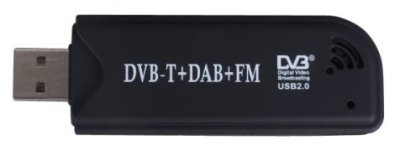
An RTL2832U-based USB SDR receiver
We’ve got more information on SDR receivers here:
What antenna do I need?
The antenna makes a big difference.
If the balloon is nearby and high in the sky, even a simple vertical antenna may receive it.
For weaker or more distant signals, a directional antenna such as a Yagi can help.
A directional antenna allows you to point towards the balloon and obtain useful gain.
As with other VHF/UHF receiving, antenna height and a clear view of the horizon can be extremely helpful.
Telemetry modes
High-altitude balloon projects don’t all use the same type of radio transmission.
Telemetry systems have included:
- RTTY
- FSK and 4-FSK
- Horus Binary
- LoRa
- Other experimental digital modes
The receiver and decoder you need therefore depend on the particular flight.
Traditional UK balloon projects made extensive use of RTTY, and the older dl-fldigi software was widely used to decode it.
That’s what we were using when this page was originally written.
What replaced dl-fldigi?
dl-fldigi still appears in older balloon-tracking guides, but there are now newer options.
One modern project is Horus-GUI, which can decode both Horus Binary telemetry and traditional UKHAS-style RTTY.
Its underlying Horus telemetry software supports several current Horus Binary formats as well as RTTY. :contentReference[oaicite:2]{index=2}
The exact software to use depends on what the balloon is transmitting, so check the flight information before setting up your receiving station.
Tracking balloons on SondeHub Amateur
The main online tracker you’re likely to encounter today is SondeHub Amateur.
It displays telemetry received from amateur high-altitude balloon flights and allows multiple receiving stations to contribute to the same flight track.
The site also includes:
- Live balloon positions
- Altitude and telemetry information
- Flight predictions
- Receiver information
- Chase-car tracking
If you remember the old HabHub / SpaceNear tracker, SondeHub Amateur is the modern replacement. The SondeHub site confirms that HabHub has now been retired.
Tracking ordinary weather balloons
There’s another closely-related activity: tracking the radiosondes carried by meteorological weather balloons.
These aren’t amateur balloon launches, but they can also be received using SDR equipment.
The main SondeHub tracker shows radiosonde flights, and software such as radiosonde_auto_rx can automatically receive, decode and upload telemetry from various types of weather sonde.
Can I help track a balloon from home?
Yes.
You don’t have to be involved with the launch itself.
If you can receive the balloon’s telemetry from your location, your receiving station may be able to contribute position reports to the tracking network.
This is one of the things that makes balloon tracking interesting – lots of independent stations can cooperate to follow the same payload.
Can you chase and recover the balloon?
That’s another part of the fun.
Launch teams often use predicted landing locations and live telemetry to follow the balloon by car.
As the balloon descends and gets closer to the ground, the receiving range falls dramatically, so nearby tracking stations become increasingly important.
Finding the payload can involve a mixture of:
- GPS tracking
- Radio reception
- Direction finding
- Driving
- Walking
- Occasionally asking a landowner for access
Remember that a tracked payload landing on private property doesn’t give you any automatic right to enter that property. Get permission before recovering equipment from private land.
How to get started
If you’d like to try high-altitude balloon tracking, a simple route is:
- Visit SondeHub Amateur and see whether any flights are active
- Check the flight’s frequency and telemetry mode
- Set up a suitable SDR or receiver
- Connect an appropriate antenna
- Use the recommended decoder for that telemetry type
- See whether you can receive and decode the balloon
Even if there isn’t an amateur balloon flight nearby, you can also experiment with receiving ordinary meteorological radiosondes through the main SondeHub network.
Useful balloon tracking links
- SondeHub Amateur – live amateur balloon tracking
- SondeHub – meteorological radiosonde tracking
- UK High Altitude Society – UK ballooning information and technical guides
- UKHAS Tracking Guide – background on receiving balloon telemetry
- UKHAS LoRa Tracking Guide
- Horus-GUI – modern telemetry decoder
Interested in radio?
You don’t need an amateur radio licence simply to experiment with receiving balloon telemetry.
If playing with SDRs, antennas and radio tracking gets you interested in making your own amateur radio transmissions, the UK Foundation licence is the normal starting point.
Essex Ham offers a FREE online Foundation training course to help you get licensed.
If you’ve tried balloon tracking, recovered a payload or built your own receiving station, please add a comment below.

Hi
I tried a spot of tracking on Sunday and I recieved some RTTY around the same frequency that you were on, I was also using an SDR and colinear. I used the default setup in fl-digi for the XABIEN transmitter but had no success. The receive frequency shift for XABIEN was set at 600Hz, did you have to use the custom setting in fl-digi to widen the frequency shift.
73’s
Tom de G0CXW
Hi Tom,
There were two balloons, CHEAPO and XABEN1, both on roughly the same flightpath but launched at different times and on two different frequencies. The frequencies drifted slightly.
Yes – I had the same problem with the width and couldn’t decode. I was logged into the IRC chatroom and others had the same problem. The fix was to change the width to a custom setting of 700 – although towards the end of the flight, I had to drop this to 660. All of the other default settings seemed to work.
Pete
Hello Pete
I couldn’t receive CHEAPO but found some rtty slightly lower in frequency than where I expected XABIEN to be, I tried to decode it using the parameters for XABIEN but without any success. The shift frequency was larger than 600Hz and I didn’t have the courage of my convictions and never adjusted the shift frequency manually… Oh well at least I heard it
Thanks for the video, if it taught me one thing it’s definately worth a fiddle
Regards
Tom
Currently studying Steve Hartly’s Advanced Distance Learning course. On the forum I have found out it is permitted by Offcom to have an antenna on a balloon, kite or drone (but the latter is probably not a good idea because of the RF) attached by coax to a tranceiver which is on the ground – i.e. a balloon antenna support.
This is something which I would like to do at a height of 50 Metres. I have e-maild the CAA about flight paths and nearby air fields etc.
I have calculated that 50 Metres of Coax would weigh about 2 KG. I am looking to work on 2 Metres and possibly also 70cms so there will be a small omni-directional antenna lifted by the balloon.
Realistically I am estimating a payload of about 3 or 4 KG will need to be lifted by the balloon. I would be grateful for details of the balloons you use and how much your payload is. I am trying to do this on the budget. Also if you have any information on helium or other light gasses this might be useful to me.
73 DE Antonio 2E0VIT
Hi guys some links on the High altitude balloon tracking are not working. Including the space nr us map.
73 Brian M0CTI