

What is an SDR?
SDR stands for Software Defined Radio.
In simple terms, an SDR uses software to do much of the work that would traditionally have been handled by hardware inside a radio.
A typical SDR setup consists of:
- A small radio receiver or USB dongle
- An antenna
- A computer, tablet or other device
- SDR software showing signals and allowing you to tune them
One of the biggest advantages is that you can often see a large chunk of spectrum on-screen at once, rather than tuning around one frequency at a time.
This makes SDR particularly useful for amateur radio, scanning, short-wave listening, aircraft reception, satellites and general radio experimentation.
What does SDR software show you?
Most SDR programs display two useful views:
- Spectrum display – shows signals across a range of frequencies
- Waterfall display – shows how signals appear and disappear over time
A strong transmission normally appears as a visible peak on the spectrum and a bright trace on the waterfall.
This means you can often spot activity visually before you’ve even tuned to it.
What can you listen to with an SDR?
That depends on the frequency coverage of the particular SDR and your antenna, but possible uses include:
- Amateur radio on VHF and UHF
- HF amateur radio and short-wave broadcasts
- FM broadcast radio
- Airband
- Marine radio
- Weather satellites
- Amateur radio satellites
- ADS-B aircraft transmissions
- Digital modes
- Radio beacons and telemetry
Not every SDR covers every frequency range, so always check the specification before buying.
Cheap USB SDR dongles
One of the reasons SDR has become so popular is that getting started can be very inexpensive.
USB receivers based on the RTL-SDR concept can provide wide frequency coverage for relatively little money and are a good way of experimenting with software-defined radio.
They’re particularly popular for VHF and UHF reception, scanning, aircraft signals and satellite work.
Some models can also receive HF directly, while others require additional hardware or a different SDR designed for HF.
Better-quality SDR receivers
If you want better receiver performance, there are more capable SDRs available from manufacturers such as Airspy and SDRplay.
Higher-performance receivers generally offer improvements such as:
- Better dynamic range
- Improved filtering
- Lower noise
- Better resistance to strong nearby signals
- Wider usable bandwidth
These differences become more important if you live somewhere with strong broadcast transmitters nearby or if you’re trying to receive weak amateur radio signals.
Popular SDR software
There are several SDR programs available, and the best one depends partly on your operating system and hardware.
Popular choices include:
- SDR# (SDRSharp) – widely used on Windows
- SDR-Console
- HDSDR
- GQRX – popular with Linux and Mac users
Modern SDR software normally lets you select the receiver mode, bandwidth, filtering, gain and other settings from the computer screen.
SDR# downloads and information »
Do you need an amateur radio licence to use an SDR?
No, not for receiving.
An SDR receiver can be used purely as a listening device, so it’s a useful way of exploring radio before getting an amateur radio licence.
If you want to transmit on amateur frequencies, you’ll need the appropriate amateur radio licence and transmitting equipment.
Can an SDR transmit?
Some SDR devices are receive-only, while others are transceivers that can both receive and transmit.
Examples of transmit-capable SDR systems include specialist amateur radio transceivers and experimental platforms such as HackRF and LimeSDR.
For beginners, however, a simple receive-only SDR is usually the easiest and cheapest place to start.
The antenna still matters
As with any radio receiver, the SDR itself is only part of the system.
A good antenna can make a much bigger difference than changing software.
The ideal antenna depends on what you want to receive:
- A simple VHF/UHF antenna for local amateur radio
- An airband antenna for aircraft
- A long wire or loop for HF
- A directional antenna for satellites
One antenna won’t necessarily perform well across the SDR’s entire frequency range.
Watch out for overload
One common beginner mistake is assuming that more gain is always better.
It isn’t.
If the gain is set too high, strong local signals can overload the receiver and produce false signals or make weaker stations harder to hear.
Start with moderate gain and increase it only until the wanted signals improve.
This is particularly important with inexpensive wideband SDR dongles.
Using an SDR remotely
Another useful feature of software-defined radio is that the receiver doesn’t necessarily have to be next to you.
Some SDR software can make a receiver available across a local network or over the Internet.
This means you could place an SDR somewhere with a better antenna and access it remotely from another computer.
Airspy’s SPY Server, for example, supports remote use of several SDR receiver types across a network.
Try SDR without buying anything
You can even experiment with software-defined radio before buying your own receiver.
There are publicly-accessible SDR receivers around the world that can be controlled through a web browser.
These are often known as WebSDR or remote SDR receivers.
They’re a good way of exploring HF bands, listening to amateur activity and learning what a waterfall display looks like.
Our early SDR experiments – the G0NQE Acorn SDR
Our first experiments with software-defined radio go back many years.
Many thanks to David Ingrey M0HBV for the loan of his SDR, featured here.
David built this receiver himself from a kit. It was the G0NQE Acorn SDR, sold at the time by Kanga Products for £19.95.
The Acorn was a single-sideband receiver covering the 80 metre amateur band around 3.5MHz.
Unlike today’s tiny USB SDR dongles, this was a traditional kit using standard through-hole components, making it suitable for someone comfortable with a soldering iron.
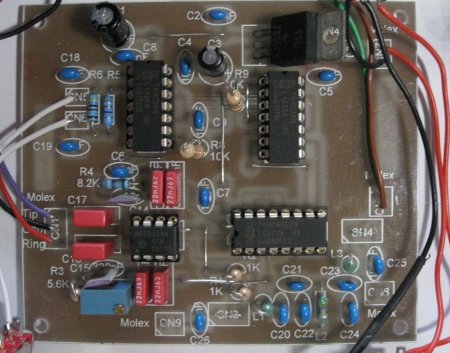
Fully constructed G0NQE Acorn SDR
How the Acorn SDR worked
The Acorn produced an audio-frequency output that was connected to the sound input of a computer.
The computer’s sound card then digitised the signal, and SDR software performed the tuning and demodulation.
This was a common approach with early amateur SDR designs.
The bandwidth visible on-screen depended largely on the capabilities of the sound card. With a 96kHz sound-card sample rate, for example, you could see a useful portion of the 80 metre band at once.
Our early SDR software
We tried a couple of SDR applications with the Acorn.
The first was M0KGK’s SDR software, which handled the audio from the Acorn and displayed activity across the band.
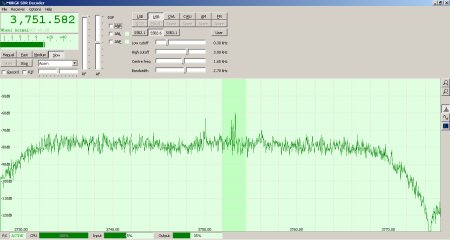
Acorn SDR output displayed using M0KGK SDR software
We also tried Winrad, which offered more controls and a waterfall display that made strong signals very easy to spot.
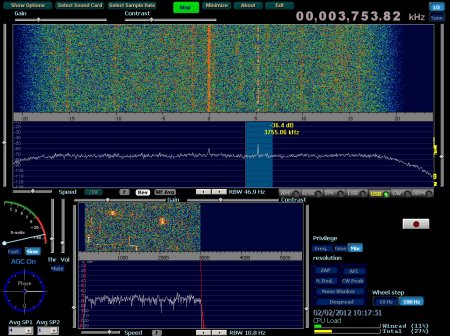
Acorn SDR output displayed using Winrad
Software and SDR hardware have moved on considerably since those early experiments, but the basic principle remains the same: the radio hardware captures part of the spectrum and software lets you see, tune and process the signals.
Is SDR worth trying?
Definitely.
SDR is one of the cheapest ways to explore a large amount of radio technology.
With one small receiver you can experiment with:
- Amateur radio
- Scanning
- Digital signal decoding
- Aircraft tracking
- Satellite reception
- Short-wave listening
- Antenna experimentation
And because you can actually see signals on the spectrum display, SDR is also an excellent way of understanding concepts such as bandwidth, modulation, noise and interference.
New to amateur radio?
You don’t need an amateur radio licence just to experiment with an SDR receiver.
If listening gets you interested in making your own transmissions, the UK Foundation licence is the normal starting point.
Essex Ham offers a FREE online Foundation training course to help you get licensed.
| Want more beginner guides? See our Getting Started Guides |
Thanks again to David M0HBV for the loan of the Acorn SDR that helped us explore software-defined radio all those years ago.

No SMD – great!
What possibilities for using a 9850 based DDS VFO with this kit instead of the xtal VFO?
73
Bob
MM0RKT