

Skip to content
  • Facebook
  • YouTube
  • Bluesky
  • Discord
  • X
  • Instagram
  • RSS
Essex Ham Logo

Essex Ham

Supporting Amateur Radio in Essex

Essex Ham's Foundation Online Course
  • Home
  • Get Started
    • What is Amateur Radio?
    • Become a Ham
    • Amateur Radio Explained
    • Guide for Parents
    • Amateur Radio Books
    • Common Questions
    • Just passed… What Next? BETA
  • Advice
    • How to Become a Ham
    • Passed? Get Your Licence
    • Just Got Your Licence?
    • Just Passed… What Next? BETA
    • Your First Handheld
    • Your First Station
    • Getting Started Guides
    • Returning to the Hobby
    • Getting Started with Data
    • Downloads & Handouts
    • Your Questions (FAQ)
  • Events
    • Events Calendar
      • Calendar View
      • Poster View
      • Upcoming Field Events
      • Upcoming Training
      • Essex Field Events This Year
      • Upcoming Local Rallies
    • Next Essex Ham Events
    • Club Events List
    • Recent Events in Essex
    • Essex 2m Activity Days
    • Annual Event List
    • Latest News & Articles
  • Training
    • How to Get Started
    • Foundation Online Course
    • Training Courses in Essex
    • Other Online Courses
    • Training Videos
    • Foundation Exam Books
    • Training Material
    • Training Information
    • Essex Training Calendar
    • For Tutors
  • Clubs
    • Support for Clubs
    • Clubs in Essex
    • Resources & Downloads
    • Training Material
    • Promotional Videos
    • Essex Speakers Directory
  • About Us
    • What is Essex Ham?
    • Latest News & Articles
    • Forums
    • Videos
    • Internet Radio Stream
    • Podcast
    • Live Weather
    • Essex Ham APRS iGate
    • Essex Ham Newsletter
    • Essex Activity Map
    • About Our Site
  • Net
    • Monday Night Net Info
    • Monday Net Chatroom
    • Monday Net Reports
    • Live Audio Feed
    • Danbury Repeater GB3DA
    • Other Nets in Essex
    • Repeaters in Essex
  • Members
    • Join our Community
      • Join Essex Ham (free)
      • Essex Ham Members FAQ
    • Forums
    • Live Chatroom
    • Merchandise
    • Recommended Kit
    • Members-Only
      • Members-Only Area
      • Member Main Page
      • Email Alerts
      • Essex Ham Newsletter
      • Email Discussion Group
  • Forums / Contact Us
    • Forums
    • Email Discussion Group
    • Need some help?
    • Contact The Team
    • Our Facebook Group
    • Discussion Group List

Using a Raspberry Pi as an APRS Gateway

Important: This is an older project

This article documents how I set up an APRS receive-only iGate using a Raspberry Pi, RTL-SDR dongle and Dire Wolf. It was originally written some years ago and refers to older Raspberry Pi hardware, software and installation methods.

The basic principle is still valid, but some of the software, commands, downloads and links on this page may now be out of date. Treat this as a record of my original project rather than a current step-by-step installation guide.

2026 update: My APRS iGate, M0PSX-10, is still in operation in Essex, receiving APRS traffic on 144.800MHz and forwarding received packets to the APRS network. You can see current APRS activity on our Essex APRS map.

This is the final part of a three-part look at some ways to use a Raspberry Pi for amateur radio purposes. In this article, I’ll be looking at how to use a Raspberry Pi to help build the APRS receiver network by turning it into a 2m receiver and uploading received positions to the worldwide APRS map.

What is a Raspberry Pi?

It’s a low-cost computer. Connect it to a screen, keyboard and mouse, and you’re on your way. The Raspberry Pi uses the Linux operating system (as opposed to Windows), and it’s pretty powerful.

At the time this article was originally written, the Raspberry Pi 3B+ was the current model, priced at around £37. I used the earlier Raspberry Pi 3, which cost around £30 and was fast enough to cope with a cheap RTL-SDR dongle, making it ideal for this amateur radio project.

You can pick up a Pi online from Amazon – Raspberry Pi at Amazon.
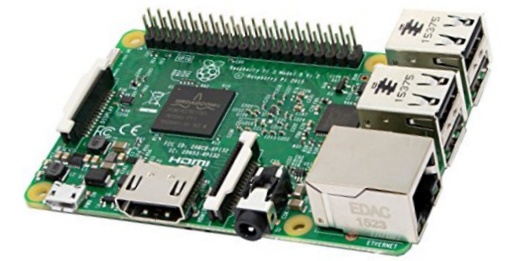
Raspberry Pi used for an APRS iGate
Raspberry Pi – the basis of my APRS iGate

Raspberry Pi as an APRS iGate?

APRS is a great system for tracking the locations of travelling radio amateurs who transmit their position over the air on 144.800MHz. The network relies on receiving stations picking up these beacon signals and forwarding the information to the Internet. If APRS is new to you, take a look at aprs.fi to see who’s about.

If you connect a Raspberry Pi and an RTL-SDR USB dongle to an antenna and the Internet, you can receive APRS packets from nearby radio amateurs and upload them to the APRS network, perhaps helping to fill in some of the coverage gaps in your area.

I’m very grateful to Keith G6NHU for saving me a lot of legwork and putting together a full set of instructions on how to do this. Keith’s original article formed the basis of this project, with some additional notes below based on my own experience.

What I needed

  • A Raspberry Pi 3 – mine cost around £30.
  • An RTL-SDR USB dongle – mine cost around £10.
  • A suitable Micro USB charger and lead – I used a 2.5A or 3A power supply rather than a 1A version.
  • A USB keyboard and mouse.
  • An HDMI display or suitable HDMI adapter.
  • A 2m antenna – I used my backup loft-mounted 2m co-linear.
  • An adapter to connect the antenna to the small MCX connector on my RTL-SDR dongle.
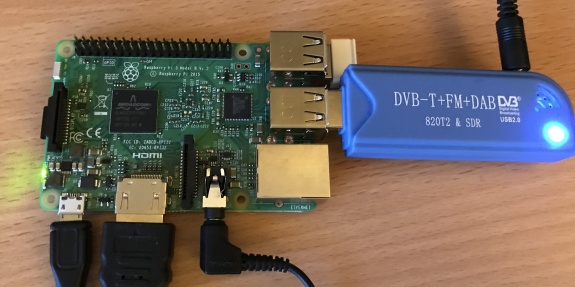
Raspberry Pi 3 connected to an RTL-SDR dongle

Preparing the software

For my original setup, I used a Micro SD card and a PC capable of writing an image to the card.

Unlike our previous two Raspberry Pi projects – Pi SDR and Pi Aircraft Tracking – for this project I used a pre-compiled Raspberry Pi image that had already been set up for APRS reception.

I used an image and instructions created by Keith G6NHU. There were two ways of setting up the APRS gateway:

  1. Using SSH to control the Pi from a PC or Mac connected to the same network.
  2. Connecting the Pi to a screen, keyboard and mouse and configuring it through the desktop interface.

I personally prefer to connect a screen to my Pi so I can see what’s going on. Doing it this way was also consistent with my previous two Pi articles, so that’s the method I used for this project.

Original article and software: Setting up an APRS iGate – QSO365.co.uk

Remember that this link and the software described above date from the original project and may no longer be current.

Setting up the software

For my original installation, I downloaded and unzipped Keith’s Raspberry Pi image, then flashed it onto a Micro SD card using Etcher or Win32DiskImager.

Once that was done, I inserted the SD card into the Pi, connected the SDR dongle and powered up the Pi.

I then connected the Pi to the Internet and edited the sdr.conf configuration file, adding my callsign, APRS ID and latitude/longitude as described in Keith’s original instructions.

Once the configuration had been saved, the system was ready to start receiving APRS packets.

Tweaking the RTL-SDR accuracy

When I first ran through the setup, I was unable to receive any packets, even though I could hear APRS packets being transmitted on 144.800MHz.

It turned out that, in my case, the problem was the frequency accuracy of the cheap RTL-SDR tuner. Some of these inexpensive dongles can be slightly off-frequency.

In my first article, Raspberry Pi as an SDR, I mentioned how to identify how far out the receiver was and enter an adjustment into the SDR software. The same trick worked here. My receiver was off by a positive value of 96ppm.

Keith also produced a guide explaining how to calibrate an RTL-SDR dongle.

For my setup, the fix involved making a small change to the dw.sh file in /usr/local/bin/.
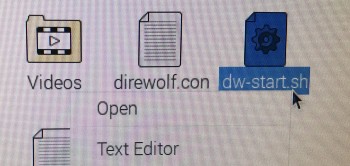
Editing the APRS iGate startup configuration
Editing the startup configuration

The original line looked like this:

DWCMD="bash -c 'rtl_fm -f 144.80M - | direwolf -c sdr.conf -f 24000 -D 1 -'"

I added the PPM correction using -p 96:

DWCMD="bash -c 'rtl_fm -f 144.80M -p 96 - | direwolf -c sdr.conf -f 24000 -D 1 -'"

After saving the change and rebooting the Pi, it worked for me.

The command above is retained to document my original installation. Current versions of RTL-SDR, Dire Wolf or Raspberry Pi OS may require a different configuration.

Xastir – See what stations are found

The setup described above uploads received APRS packets to the Internet so that they can be viewed on aprs.fi. But what if you want to see the received packets locally on a map?

I used a program called Xastir. I configured Xastir to receive APRS data from Dire Wolf using its Networked AGWPE interface on localhost port 8000.

Adding voice alerts to Xastir

I also configured the Pi iGate to speak when a new station was detected. I did this using the media player sox and the Xastir sound files.

One little “gotcha” was that the audio initially came out of the Pi’s HDMI socket rather than the 3.5mm audio socket. I changed the audio output to analogue using the speaker control on the Pi desktop.
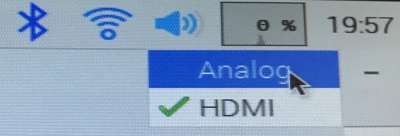
Raspberry Pi audio output selector

Voice alerts were a nice feature to add to the Raspberry Pi APRS iGate and potentially useful for amateur radio demonstrations.

Some of the gotchas

  • Use a decent power supply. In my early experiments, the Pi kept losing its connection to the RTL-SDR dongle. I discovered that the 1A phone charger I was using wasn’t adequate to power both the Pi 3 and the dongle. Changing to a suitable power supply solved the problem.
  • RTL-SDR frequency accuracy. My inexpensive SDR dongle needed a PPM correction before APRS reception became reliable.
  • Running too hot? Depending on the Raspberry Pi and its environment, a heatsink or additional cooling may be useful.

Still running in 2026

Although the installation described in this article is now quite old, the APRS iGate I set up as part of this project is still running. M0PSX-10 continues to receive APRS traffic in the Essex area and pass received packets onto the APRS network.

You can see APRS stations and receiver sites around Essex on our live Essex APRS map.

Hopefully you’ve found this article, and our previous two Raspberry Pi projects, of interest. If you have a comment, please add it in the box below.

Related links

  • Live Essex APRS Map
  • Essex Ham APRS iGate
  • Part 1: Raspberry Pi – Running as an SDR
  • Part 2: Raspberry Pi – Tracking Aircraft
  • Realtek RTL-SDR Dongle
  • APRS.fi

Copyright © 2011-2026 Essex Ham. Home | About This Site | Site Terms & Privacy | GDPR Statement

Powered by PressBook WordPress theme

This site uses cookies to enhance your browsing experience, serve personalised ads or content, and analyze our traffic. By clicking “Accept All”, you consent to our use of cookies, however you can select "Cookie Settings" to control your consent. View Terms & Privacy Policy
Cookie SettingsAccept All
Manage consent

Privacy Overview

This website uses cookies to improve your experience while you navigate through the website. Out of these, the cookies that are categorized as necessary are stored on your browser as they are essential for the working of basic functionalities of the website. We also use third-party cookies that help us analyze and understand how you use this website. These cookies will be stored in your browser only with your consent. You also have the option to opt-out of these cookies. But opting out of some of these cookies may affect your browsing experience.
Necessary
Always Enabled
Necessary cookies are absolutely essential for the website to function properly. These cookies ensure basic functionalities and security features of the website, anonymously.
CookieDurationDescription
apbct_cookies_testsessionCleanTalk sets this cookie to prevent spam on comments and forms and act as a complete anti-spam solution and firewall for the site.
apbct_headlesssessionCleantalk set this cookie to detect spam and improve the website's security.
apbct_page_hitssessionCleanTalk sets this cookie to prevent spam on comments and forms and act as a complete anti-spam solution and firewall for the site.
apbct_prev_referersessionFunctional cookie placed by CleanTalk Spam Protect to store referring IDs and prevent unauthorized spam from being sent from the website.
apbct_site_landing_tssessionCleanTalk sets this cookie to prevent spam on comments and forms and act as a complete anti-spam solution and firewall for the site.
apbct_site_referer3 daysThis cookie is placed by CleanTalk Spam Protect to prevent spam and to store the referrer page address which led the user to the website.
apbct_timestampsessionCleanTalk sets this cookie to prevent spam on comments and forms and act as a complete anti-spam solution and firewall for the site.
apbct_urls3 daysThis cookie is placed by CleanTalk Spam Protect to prevent spam and to store the addresses (urls) visited on the website.
cookielawinfo-checkbox-advertisement1 yearSet by the GDPR Cookie Consent plugin, this cookie is used to record the user consent for the cookies in the "Advertisement" category .
cookielawinfo-checkbox-analytics11 monthsThis cookie is set by GDPR Cookie Consent plugin. The cookie is used to store the user consent for the cookies in the category "Analytics".
cookielawinfo-checkbox-functional11 monthsThe cookie is set by GDPR cookie consent to record the user consent for the cookies in the category "Functional".
cookielawinfo-checkbox-necessary11 monthsThis cookie is set by GDPR Cookie Consent plugin. The cookies is used to store the user consent for the cookies in the category "Necessary".
cookielawinfo-checkbox-others11 monthsThis cookie is set by GDPR Cookie Consent plugin. The cookie is used to store the user consent for the cookies in the category "Other.
cookielawinfo-checkbox-performance11 monthsThis cookie is set by GDPR Cookie Consent plugin. The cookie is used to store the user consent for the cookies in the category "Performance".
CookieLawInfoConsent1 yearRecords the default button state of the corresponding category & the status of CCPA. It works only in coordination with the primary cookie.
ct_checkjssessionCleanTalk–Used to prevent spam on our comments and forms and acts as a complete anti-spam solution and firewall for this site.
ct_fkp_timestampsessionCleanTalk sets this cookie to prevent spam on the site's comments/forms, and to act as a complete anti-spam solution and firewall for the site.
ct_has_scrolledsessionCleanTalk sets this cookie to store dynamic variables from the browser.
ct_pointer_datasessionCleanTalk sets this cookie to prevent spam on the site's comments/forms, and to act as a complete anti-spam solution and firewall for the site.
ct_ps_timestampsessionCleanTalk sets this cookie to prevent spam on the site's comments/forms, and to act as a complete anti-spam solution and firewall for the site.
ct_sfw_pass_key1 monthCleanTalk sets this cookie to prevent spam on comments and forms and act as a complete anti-spam solution and firewall for the site.
ct_timezonesessionCleanTalk–Used to prevent spam on our comments and forms and acts as a complete anti-spam solution and firewall for this site.
sessionIdsessionThis cookie, set by Microsoft, is used by the website to store the user's session ID and is sent with each request to the ASP.NET application.
viewed_cookie_policy11 monthsThe cookie is set by the GDPR Cookie Consent plugin and is used to store whether or not user has consented to the use of cookies. It does not store any personal data.
Functional
Functional cookies help to perform certain functionalities like sharing the content of the website on social media platforms, collect feedbacks, and other third-party features.
CookieDurationDescription
apbct_pixel_urlsessionCleanTalk set this cookie to provide spam protection.
__cf_bm30 minutesThis cookie, set by Cloudflare, is used to support Cloudflare Bot Management.
Performance
Performance cookies are used to understand and analyze the key performance indexes of the website which helps in delivering a better user experience for the visitors.
CookieDurationDescription
_gat1 minuteThis cookie is installed by Google Universal Analytics to restrain request rate and thus limit the collection of data on high traffic sites. For details of this cookie, go to Google's Privacy & Terms site
Analytics
Analytical cookies are used to understand how visitors interact with the website. These cookies help provide information on metrics the number of visitors, bounce rate, traffic source, etc.
CookieDurationDescription
CONSENT2 yearsYouTube sets this cookie via embedded youtube-videos and registers anonymous statistical data.
ct_screen_infosessionCleanTalk sets this cookie to complete an anti-spam solution and firewall for the website, preventing spam from appearing in comments and forms.
UID1 year 1 month 4 daysScorecard Research sets this cookie for browser behaviour research.
_ga1 year 1 month 4 daysThe _ga cookie, installed by Google Analytics, calculates visitor, session and campaign data and also keeps track of site usage for the site's analytics report. The cookie stores information anonymously and assigns a randomly generated number to recognize unique visitors. For details of this cookie, go to Google's Privacy & Terms site
_gat_gtag_UA_*1 minuteSet by Google to distinguish users. For details of this cookie, go to Google's Privacy & Terms site
_gid1 dayInstalled by Google Analytics, _gid cookie stores information on how visitors use a website, while also creating an analytics report of the website's performance. Some of the data that are collected include the number of visitors, their source, and the pages they visit anonymously. For details of this cookie, go to Google's Privacy & Terms site
__gads1 year 24 daysThe __gads cookie, set by Google, is stored under DoubleClick domain and tracks the number of times users see an advert, measures the success of the campaign and calculates its revenue. This cookie can only be read from the domain they are set on and will not track any data while browsing through other sites. For details of this cookie, go to Google's Privacy & Terms site
Advertisement
Advertisement cookies are used to provide visitors with relevant ads and marketing campaigns. These cookies track visitors across websites and collect information to provide customized ads.
CookieDurationDescription
DSID1 hourThis cookie is set by DoubleClick to note the user's specific user identity. It contains a hashed/encrypted unique ID.
ebaysessionThe domain of this cookie is owned by Ebay. This cookie is used for targeting and advertising purpose.
IDE1 year 24 daysGoogle DoubleClick IDE cookies are used to store information about how the user uses the website to present them with relevant ads and according to the user profile.
mc1 year 1 monthQuantserve sets the mc cookie to anonymously track user behaviour on the website.
test_cookie15 minutesThe test_cookie is set by doubleclick.net and is used to determine if the user's browser supports cookies.
VISITOR_INFO1_LIVE5 months 27 daysA cookie set by YouTube to measure bandwidth that determines whether the user gets the new or old player interface.
YSCsessionYSC cookie is set by Youtube and is used to track the views of embedded videos on Youtube pages.
yt-remote-connected-devicesneverYouTube sets this cookie to store the video preferences of the user using embedded YouTube video.
yt-remote-device-idneverYouTube sets this cookie to store the video preferences of the user using embedded YouTube video.
yt.innertube::nextIdneverThis cookie, set by YouTube, registers a unique ID to store data on what videos from YouTube the user has seen.
yt.innertube::requestsneverThis cookie, set by YouTube, registers a unique ID to store data on what videos from YouTube the user has seen.
__gpi1 year 24 daysGoogle Ads Service uses this cookie to collect information about from multiple websites for retargeting ads. For details of this cookie, go to Google's Privacy & Terms site
__qcaneverThe __qca cookie is associated with Quantcast. This anonymous data helps us to better understand users' needs and customize the website accordingly.
Others
Other uncategorized cookies are those that are being analyzed and have not been classified into a category as yet.
CookieDurationDescription
DEVICE_INFO5 months 27 daysNo description
dp12 yearsNo description available.
nonsession2 yearsNo description available.
rtid14 years 10 months 2 days 1 hourDescription unavailable.
ssessionNo description
slimstat_tracking_code1 monthNo description available.
SAVE & ACCEPT
Powered by CookieYes Logo