

Skip to content
  • Facebook
  • YouTube
  • Bluesky
  • Discord
  • X
  • Instagram
  • Tiktok
  • RSS
Essex Ham Logo

Essex Ham

Supporting Amateur Radio in Essex

Essex Ham's Foundation Online Course
  • Home
  • Get Started
    • What is Amateur Radio?
    • Become a Ham
    • Amateur Radio Explained
    • Guide for Parents
    • Amateur Radio Books
    • Common Questions
    • Just passed… What Next? BETA
  • Advice
    • How to Become a Ham
    • Passed? Get Your Licence
    • Just Got Your Licence?
    • Just Passed… What Next? BETA
    • Your First Handheld
    • Your First Station
    • Getting Started Guides
    • Returning to the Hobby
    • Getting Started with Data
    • Downloads & Handouts
    • Your Questions (FAQ)
  • Events
    • Events Calendar
      • Calendar View
      • Poster View
      • Upcoming Field Events
      • Upcoming Training
      • Essex Field Events This Year
      • Upcoming Local Rallies
    • Next Essex Ham Events
    • Club Events List
    • Recent Events in Essex
    • Essex 2m Activity Days
    • Annual Event List
    • Latest News & Articles
  • Training
    • How to Get Started
    • Foundation Online Course
    • Training Courses in Essex
    • Other Online Courses
    • Training Videos
    • Foundation Exam Books
    • Training Material
    • Training Information
    • Essex Training Calendar
    • For Tutors
  • Clubs
    • Support for Clubs
    • Clubs in Essex
    • Resources & Downloads
    • Training Material
    • Promotional Videos
    • Essex Speakers Directory
  • About Us
    • What is Essex Ham?
    • Latest News & Articles
    • Forums
    • Videos
    • Internet Radio Stream
    • Podcast
    • Live Weather
    • Essex Ham APRS iGate
    • Essex Ham Newsletter
    • Essex Activity Map
    • About Our Site
  • Net
    • Monday Night Net Info
    • Monday Net Chatroom
    • Monday Net Reports
    • Live Audio Feed
    • Danbury Repeater GB3DA
    • Other Nets in Essex
    • Repeaters in Essex
  • Members
    • Join our Community
      • Join Essex Ham (free)
      • Essex Ham Members FAQ
    • Forums
    • Live Chatroom
    • Merchandise
    • Recommended Kit
    • Members-Only
      • Members-Only Area
      • Member Main Page
      • Email Alerts
      • Essex Ham Newsletter
      • Email Discussion Group
  • Forums / Contact Us
    • Forums
    • Email Discussion Group
    • Need some help?
    • Contact The Team
    • Our Facebook Group
    • Discussion Group List

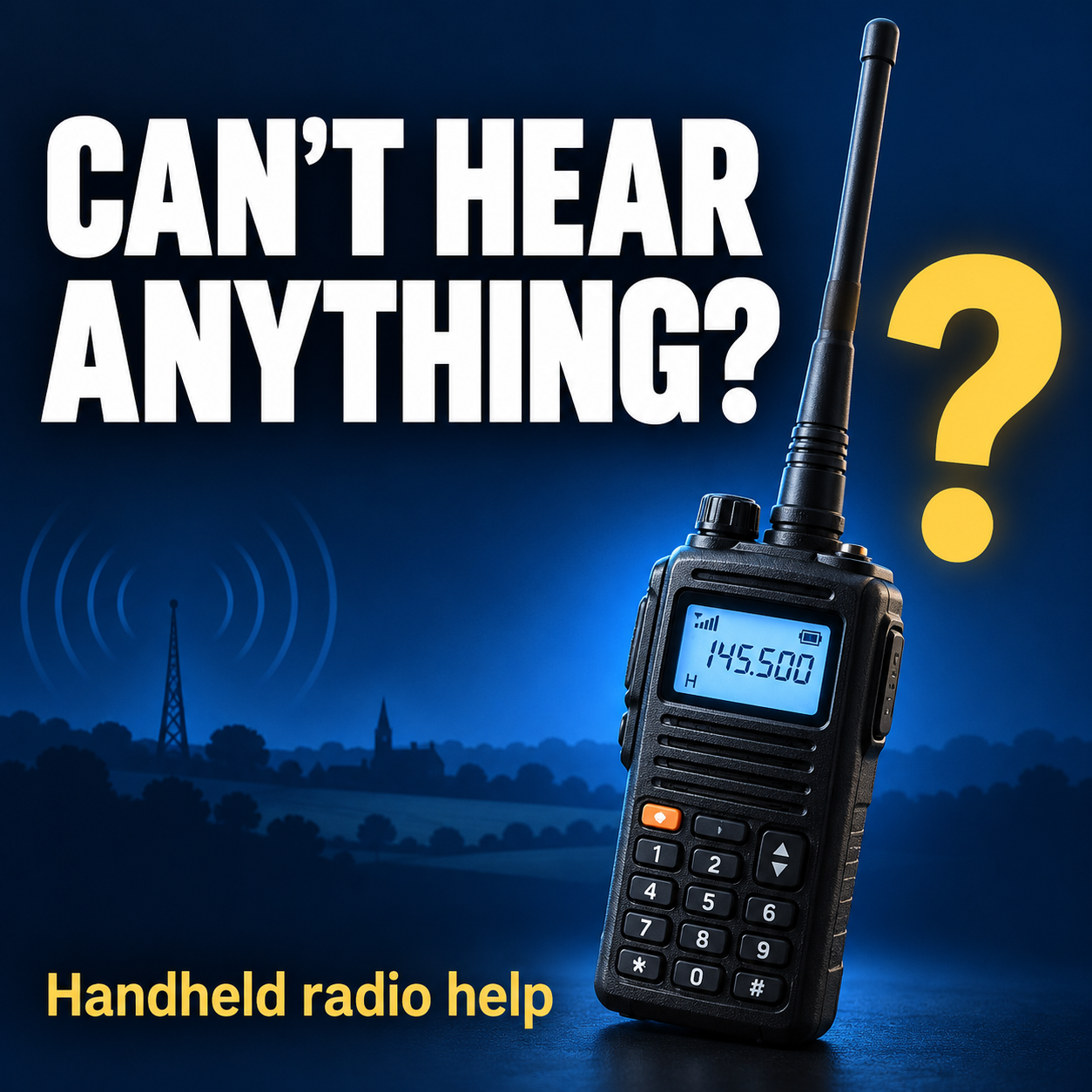
Got a handheld radio but can’t hear anything?

Can't hear anything? Get helpIf you’ve just bought a handheld radio for amateur radio, but can’t hear anything, here is some simple help.

Unlike broadcast radio, amateur radio can be silent until someone nearby starts talking. If you can’t hear anything, it doesn’t mean your radio is broken. Follow these simple steps to get started.

1. Check the basics

  • Is the radio switched on and does it have enough charge?
  • Is the aerial securely attached?
  • Is the volume turned up?
  • Are you in a suitable location? Try listening outside, with the aerial pointing upwards.

This guide is for handhelds that receive VHF/UHF amateur radio in FM mode. Buttons and menu names vary between models.

2. Choose a frequency

The frequency is the number on your radio’s screen. It tells the radio where to listen.

A starting point in the UK is 145.500 MHz. This is a frequency radio amateurs use to call other local amateurs. It is busier in some parts of the country than others, so don’t be put off if you can’t hear anything

Select frequency mode, sometimes called VFO, then enter 145.500 using the keypad. If your radio has no keypad, there might be a tuning knob or up/down arrows. Check the radio’s instructions for selecting a frequency.

You may hear nothing straight away. This frequency isn’t continuously in use.

3. Check two settings

Look in your radio’s menu for:

  • Squelch / SQL: Set this as low as possible. If the setting is too high, it may stop you from receiving weaker signals. If you hear constant hissing, raise it just enough to stop the hiss.
  • Receive CTCSS / DCS: Turn these off. They can keep the speaker silent unless a signal carries a matching tone or code. Menu names may include R-CTCSS, R-DCS or Tone Squelch.

If your radio offers a choice of receiving modes, select FM for the analogue voice signals covered here.

4. Find a local repeater

A repeater is a radio station that relays people’s conversations over a wider area. A nearby one can be a good place to listen.

  1. Go to UKRepeater.net and select Lists from the menu
  2. Go to the Maps List page and look in both the “2m” and the “70cm” lists for an operational analogue FM repeater near your town.
  3. Find its output frequency—that’s the frequency you enter into your radio to hear it. See example below
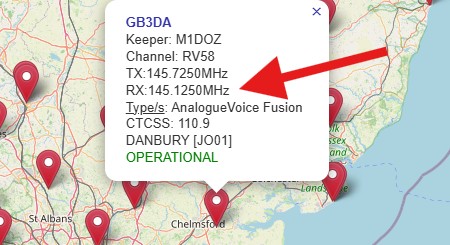
Example of the settings for a 2m repeater near Chelmsford
Example of the settings for a 2m repeater near Chelmsford. Tune to the RX (receive) frequency as shown here

There are also various repeater apps for smartphones and tablets, so try your phone’s app store.

For listening, you don’t need to set a transmit offset or transmit access tone. Leave receive CTCSS and DCS off.

Stuck finding one? Ask a local amateur radio club which repeater to try and when people normally use it.

5. Listen when people are talking

Even a working repeater can be quiet.

Ask local amateurs in your area about a local net—a group conversation held at an arranged time. Listening then gives you a better chance of hearing something than trying at random. Local clubs in your area usually list net times and frequencies

If you still hear nothing, you may be out of range. Using a handheld indoors in a built-up area will reduce the range. Try outside, somewhere higher, or by getting nearer to your local repeater. If you have a friendly amateur in the area, ask then to pout out a test call that you can listen to.

Still need help?

It may be useful to get help from local amateurs, as they will know which frequencies and repeaters are in use. Try your local amateur radio club. If not, ask for help from Essex Ham members. When asking for help, include:

  • Your radio’s make and exact model
  • Your nearest town—no need for your full address
  • The frequency you’re listening on
  • Whether you’re indoors or outside
  • Which steps above you’ve tried

A clear photo of the radio’s screen can help too.

For this guide, just listen: leave the transmit button alone.

Want to learn how it all works?

Essex Ham offers a FREE online Foundation training course for people new to amateur radio.

Find out about Foundation Online »

Handy Links

  • For more explanation, see Listening in to Amateur Radio.


Leave a Reply Cancel reply

Your email address will not be published. Required fields are marked *


Copyright © 2011-2026 Essex Ham. Home | About This Site | Site Terms & Privacy | GDPR Statement

Powered by PressBook WordPress theme

This site uses cookies to enhance your browsing experience, serve personalised ads or content, and analyze our traffic. By clicking “Accept All”, you consent to our use of cookies, however you can select "Cookie Settings" to control your consent. View Terms & Privacy Policy
Cookie SettingsAccept All
Manage consent

Privacy Overview

This website uses cookies to improve your experience while you navigate through the website. Out of these, the cookies that are categorized as necessary are stored on your browser as they are essential for the working of basic functionalities of the website. We also use third-party cookies that help us analyze and understand how you use this website. These cookies will be stored in your browser only with your consent. You also have the option to opt-out of these cookies. But opting out of some of these cookies may affect your browsing experience.
Necessary
Always Enabled
Necessary cookies are absolutely essential for the website to function properly. These cookies ensure basic functionalities and security features of the website, anonymously.
CookieDurationDescription
apbct_cookies_testsessionCleanTalk sets this cookie to prevent spam on comments and forms and act as a complete anti-spam solution and firewall for the site.
apbct_headlesssessionCleantalk set this cookie to detect spam and improve the website's security.
apbct_page_hitssessionCleanTalk sets this cookie to prevent spam on comments and forms and act as a complete anti-spam solution and firewall for the site.
apbct_prev_referersessionFunctional cookie placed by CleanTalk Spam Protect to store referring IDs and prevent unauthorized spam from being sent from the website.
apbct_site_landing_tssessionCleanTalk sets this cookie to prevent spam on comments and forms and act as a complete anti-spam solution and firewall for the site.
apbct_site_referer3 daysThis cookie is placed by CleanTalk Spam Protect to prevent spam and to store the referrer page address which led the user to the website.
apbct_timestampsessionCleanTalk sets this cookie to prevent spam on comments and forms and act as a complete anti-spam solution and firewall for the site.
apbct_urls3 daysThis cookie is placed by CleanTalk Spam Protect to prevent spam and to store the addresses (urls) visited on the website.
cookielawinfo-checkbox-advertisement1 yearSet by the GDPR Cookie Consent plugin, this cookie is used to record the user consent for the cookies in the "Advertisement" category .
cookielawinfo-checkbox-analytics11 monthsThis cookie is set by GDPR Cookie Consent plugin. The cookie is used to store the user consent for the cookies in the category "Analytics".
cookielawinfo-checkbox-functional11 monthsThe cookie is set by GDPR cookie consent to record the user consent for the cookies in the category "Functional".
cookielawinfo-checkbox-necessary11 monthsThis cookie is set by GDPR Cookie Consent plugin. The cookies is used to store the user consent for the cookies in the category "Necessary".
cookielawinfo-checkbox-others11 monthsThis cookie is set by GDPR Cookie Consent plugin. The cookie is used to store the user consent for the cookies in the category "Other.
cookielawinfo-checkbox-performance11 monthsThis cookie is set by GDPR Cookie Consent plugin. The cookie is used to store the user consent for the cookies in the category "Performance".
CookieLawInfoConsent1 yearRecords the default button state of the corresponding category & the status of CCPA. It works only in coordination with the primary cookie.
ct_checkjssessionCleanTalk–Used to prevent spam on our comments and forms and acts as a complete anti-spam solution and firewall for this site.
ct_fkp_timestampsessionCleanTalk sets this cookie to prevent spam on the site's comments/forms, and to act as a complete anti-spam solution and firewall for the site.
ct_has_scrolledsessionCleanTalk sets this cookie to store dynamic variables from the browser.
ct_pointer_datasessionCleanTalk sets this cookie to prevent spam on the site's comments/forms, and to act as a complete anti-spam solution and firewall for the site.
ct_ps_timestampsessionCleanTalk sets this cookie to prevent spam on the site's comments/forms, and to act as a complete anti-spam solution and firewall for the site.
ct_sfw_pass_key1 monthCleanTalk sets this cookie to prevent spam on comments and forms and act as a complete anti-spam solution and firewall for the site.
ct_timezonesessionCleanTalk–Used to prevent spam on our comments and forms and acts as a complete anti-spam solution and firewall for this site.
sessionIdsessionThis cookie, set by Microsoft, is used by the website to store the user's session ID and is sent with each request to the ASP.NET application.
viewed_cookie_policy11 monthsThe cookie is set by the GDPR Cookie Consent plugin and is used to store whether or not user has consented to the use of cookies. It does not store any personal data.
Functional
Functional cookies help to perform certain functionalities like sharing the content of the website on social media platforms, collect feedbacks, and other third-party features.
CookieDurationDescription
apbct_pixel_urlsessionCleanTalk set this cookie to provide spam protection.
__cf_bm30 minutesThis cookie, set by Cloudflare, is used to support Cloudflare Bot Management.
Performance
Performance cookies are used to understand and analyze the key performance indexes of the website which helps in delivering a better user experience for the visitors.
CookieDurationDescription
_gat1 minuteThis cookie is installed by Google Universal Analytics to restrain request rate and thus limit the collection of data on high traffic sites. For details of this cookie, go to Google's Privacy & Terms site
Analytics
Analytical cookies are used to understand how visitors interact with the website. These cookies help provide information on metrics the number of visitors, bounce rate, traffic source, etc.
CookieDurationDescription
CONSENT2 yearsYouTube sets this cookie via embedded youtube-videos and registers anonymous statistical data.
ct_screen_infosessionCleanTalk sets this cookie to complete an anti-spam solution and firewall for the website, preventing spam from appearing in comments and forms.
UID1 year 1 month 4 daysScorecard Research sets this cookie for browser behaviour research.
_ga1 year 1 month 4 daysThe _ga cookie, installed by Google Analytics, calculates visitor, session and campaign data and also keeps track of site usage for the site's analytics report. The cookie stores information anonymously and assigns a randomly generated number to recognize unique visitors. For details of this cookie, go to Google's Privacy & Terms site
_gat_gtag_UA_*1 minuteSet by Google to distinguish users. For details of this cookie, go to Google's Privacy & Terms site
_gid1 dayInstalled by Google Analytics, _gid cookie stores information on how visitors use a website, while also creating an analytics report of the website's performance. Some of the data that are collected include the number of visitors, their source, and the pages they visit anonymously. For details of this cookie, go to Google's Privacy & Terms site
__gads1 year 24 daysThe __gads cookie, set by Google, is stored under DoubleClick domain and tracks the number of times users see an advert, measures the success of the campaign and calculates its revenue. This cookie can only be read from the domain they are set on and will not track any data while browsing through other sites. For details of this cookie, go to Google's Privacy & Terms site
Advertisement
Advertisement cookies are used to provide visitors with relevant ads and marketing campaigns. These cookies track visitors across websites and collect information to provide customized ads.
CookieDurationDescription
DSID1 hourThis cookie is set by DoubleClick to note the user's specific user identity. It contains a hashed/encrypted unique ID.
ebaysessionThe domain of this cookie is owned by Ebay. This cookie is used for targeting and advertising purpose.
IDE1 year 24 daysGoogle DoubleClick IDE cookies are used to store information about how the user uses the website to present them with relevant ads and according to the user profile.
mc1 year 1 monthQuantserve sets the mc cookie to anonymously track user behaviour on the website.
test_cookie15 minutesThe test_cookie is set by doubleclick.net and is used to determine if the user's browser supports cookies.
VISITOR_INFO1_LIVE5 months 27 daysA cookie set by YouTube to measure bandwidth that determines whether the user gets the new or old player interface.
YSCsessionYSC cookie is set by Youtube and is used to track the views of embedded videos on Youtube pages.
yt-remote-connected-devicesneverYouTube sets this cookie to store the video preferences of the user using embedded YouTube video.
yt-remote-device-idneverYouTube sets this cookie to store the video preferences of the user using embedded YouTube video.
yt.innertube::nextIdneverThis cookie, set by YouTube, registers a unique ID to store data on what videos from YouTube the user has seen.
yt.innertube::requestsneverThis cookie, set by YouTube, registers a unique ID to store data on what videos from YouTube the user has seen.
__gpi1 year 24 daysGoogle Ads Service uses this cookie to collect information about from multiple websites for retargeting ads. For details of this cookie, go to Google's Privacy & Terms site
__qcaneverThe __qca cookie is associated with Quantcast. This anonymous data helps us to better understand users' needs and customize the website accordingly.
Others
Other uncategorized cookies are those that are being analyzed and have not been classified into a category as yet.
CookieDurationDescription
DEVICE_INFO5 months 27 daysNo description
dp12 yearsNo description available.
nonsession2 yearsNo description available.
rtid14 years 10 months 2 days 1 hourDescription unavailable.
ssessionNo description
slimstat_tracking_code1 monthNo description available.
SAVE & ACCEPT
Powered by CookieYes Logo