

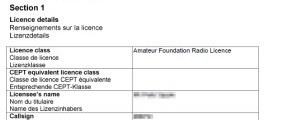
This page aimed at those who have just completed their Foundation course and now have their licence. If you’ve passed your exam, but have not yet got your licence and callsign, see our how to apply for your licence page.
Just passed your Foundation exam? Congratulations!
When you’ve just been awarded your Foundation licence and got your callsign, it can be difficult what to do next – how to get on-air and how to chat to others to get help and advice.
On this page, we try to outline the basics of what you need to know, and how to get on-air with other amateurs.
There are so many aspects to the hobby that it’s impossible to cover all of the things that you can now do with your licence. The following guide is based on my personal observation of what worked for me, and it may not be right for everyone…
| VIDEO: Just Passed? What’s Next… |
Getting started on 2 metres
If you’re interested in talking to other amateurs within a 50 mile radius, then the 2 metre band (144MHz to 146MHz) is where much of the action takes place. Although it’s not hugely busy, this band is a good place to get chatting. Most of the people you can ‘work’ on 2 metres are local, and there’s a good mix of home-based and mobile users that you can chat to. If you’ve attended a local Foundation course, you may find many of the graduates of the course, plus some of the people , on 2 metres, making it a good place for information and advice.
| Essex Tip: If you’re in the Essex area, you might like to give our Monday Night Net a try – it’s designed as a regular meeting place for M6 and M7 Foundation licence holders to have a chat and ask questions – it’s generally attended by a mix of people of all licence levels. See our Essex Ham Monday Night Net page |
You’ll need to get yourself a 2 metre radio, of course, and you have the choice of a handheld portable unit (normally 5 watts), or a mobile rig that you can either mount in a car, or use at home with a 12V power supply.
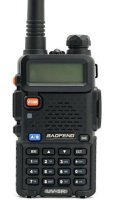
The first 2m radio that many people purchase, is a 2m/70cm handheld, on the grounds that they’re cheap, and can be used out-and-about, in a car, as well as at home. Many people getting started opt to get one of the low-price Baofeng handsets, which cost between £25 and £30 on Amazon – The two most popular models are:
These are not the world’s greatest radios, but for the price, they’re very good value – they give you access to 2m and 70cm, can be used on the local repeaters, and can connect to an external antenna.
2m handheld radios generally come with a short rubber duck aerial, which is only really going to be of use over a short distance. Assuming you want to talk to people over a mile-or-so away, you’ll need to connect the radio to a more suitable aerial – either one on your car roof, or a fixed aerial at home.
Given that many 2m amateurs operate mobile, the ability to take your radio in a car (with a suitable mag-mount aerial for the roof) is a plus. For working at home, you can plug a larger fixed aerial into the handheld’s aerial socket. For a fixed home aerial, you could look at a vertical roof aerial, something in the loft, or at a push, a mag-mount antenna placed on a biscuit tin lid.
| Essex Tip: A portable 2m handheld gives you up to 5 watts of power, but with a £20 magnetic car aerial, or a proper VHF vertical at home, that 5 watts should get you into the Danbury repeater (GB3DA) from most parts of Essex, and using that repeater, you should be able to ‘work’ most of Essex. Make sure the radio you get supports CTCSS tones (required for ‘opening’ the Danbury repeater) |
If you’re looking for a 2m radio, there are some bargains to be had on eBay and Amazon, or there are several online amateur radio stores.
Related link: Getting Started: Your first handheld | Getting Started: Your First Station
Essex: The Danbury 2 metre Repeater
If you want to be able to chat to other amateur operators in Essex, you should get familiar with the Danbury 2 metre repeater, known as GB3DA.
This is maintained by the Essex Repeater Group and is available to all licensed hams.
This repeater operates at a power of 25 watts, and has a decent coverage of the majority of Essex. Here’s what you need to know:
- The Output frequency is 145.725MHz (you listen on this frequency)
- The Input frequency is 145.125MHz (you transmit on this frequency)
- To ‘open’ the repeater, you need set your radio to use the CTCSS tone 110.9Hz
- The repeater will “time out” if you talk for too long, so keep each ‘over’ to two minutes or less
- After each transmission, the repeater sends out a Morse “K”. Wait until you hear this before keying up (as this resets the timeout)
We’d encourage you to have a listen to 145.725MHz to get used to the repeater, and how it’s used. Although you’re not required to use your callsign at the start of each ‘over’, that’s the convention used by most operators. To put out a call for a chat, the syntax is generally something like:
“This is M6___ listening through GB3DA for any calls”
More information: Danbury Repeater GB3DA
Join Essex Ham
 New to the hobby? We’d love you to consider joining Essex Ham.
Membership is free, and we’ll allow you access to extra sections of this site, use of our forum, and updates about events and training here in Essex.
More information: Join Essex Ham
QRZ.com
This is the phone book for amateur radio folk. All operators are encouraged to add their details (name, location, etc), plus perhaps a picture or two, to the directory. You have to be a licensed ham to be able to add or edit information, as well as to access personal details.
You’ll find the directory at: www.qrz.com
Adding your callsign: The process of getting your callsign added to the QRZ database isn’t obvious. Here’s a guide:
- Go to the QRZ.com forum and register for a forum account. You’ll have to wait while QRZ activates your account
- When activated, post a message in the Callsign Database forum asking to have your callsign edited. You’ll have to wait for your post to be moderated, and then for a database helper to add your callsign
Once this is done, you can then log on and edit your profile from the main QRZ site.
Getting Started on HF
With an HF radio and a suitable antenna, you can work the world, even on the 25 watts allowed at Foundation. With radios costing £400+ upwards, the need for a power supply unit, an antenna tuning unit and an SWR meter, the costs add up. Have a read of the following guides:
- Setting up your first station
- Introduction to HF: The HF Bands – A look at what to expect from each of the HF bands
- Introduction to HF: Selecting a Transceiver – What to consider when buying your first rig
- Introduction to HF: Aerials – A look at feeders, HF aerials, and options for what may work for your shack
Digital Voice
If you want the ability to talk around the world from a handheld, you might want to look at Digital Voice – There are two systems in use in Essex: DMR and D-Star. You can connect from your handheld to a DV repeater and make contact with others around the world. The repeaters are connected using the Internet, making the long trip possible. DMR seems to be gaining traction, with new repeaters appearing in Essex, and handhelds now only costing around £100.
More information: DMR and D-Star
Echolink
Echolink is a system that combines RF and the Internet. It can only be used by licensed amateurs, and to use the Internet system, you have to register using your callsign.
You can download Echolink onto your desktop or laptop computer, and an application for iPhone, iPad and Android smartphones is also available – Go to www.echolink.org
You can use Echolink to contact other amateurs around the world, and use your computer or phones mic and speaker to talk (think MSN or Skype for Amateurs). It’s great for situations where you can’t use a radio, can’t get an aerial, or want to connect with an amateur who’s outside the range of your radio equipment.
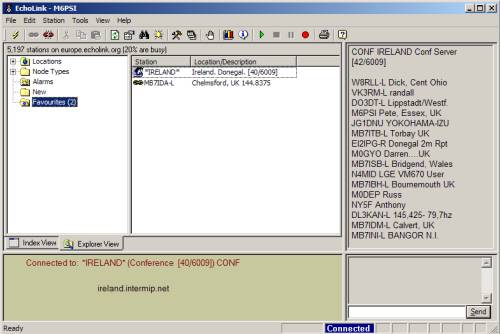
There is a radio transmission component too – there are a number of local repeater nodes, and using the DTMF keypad on your transmitter, you can open a local node and type in a target node.
If the idea of Echolink appeals, have a listen to the Ireland Conference Server, and get a feel for how it works. For more on Echolink, see our Echolink Hands-on Guide.
PSK31
This is a data service, as opposed to speech. You can connect your radio to a computer, and then communicate by keyboard with amateurs around the world. You will typically need an interface of some kind to connect your computer to your radio, and it seems that most commonly, hams use Ham Radio Deluxe as the software, and then communicate with other amateurs using 80m, 40m and 20m HF.
For more information PSK31, see our Introduction to PSK31 or the official PSK31 site
Other Resources
Anything else we should add to this page? Please let us know, or add a comment below.

have just bought 2 moonraker ht-90E walkie talkies..just cant get any info on what there range is…i know it depends on terrain etc but being 5 watts thought they would have quite a good range????..using them in the highlands of scotland…many thanks..
Hi Justin. The Moonraker HT-90E mentioned in our article is for use by licensed amateur radio operators, and is not intended for use by anyone who’s not got an amateur radio licence issues by OfCom. They’re not intended to be used as walkie-talkies.
Justin,
Having worked VHF in the Trossachs National Park in western Scotland, I can assure you that the range will be limited at anything but hilltop level. Camping on the banks of bonnie Loch Lomond, and using 2m, I was lucky to get into Glassgow with 50 Watts, a distance of only 7 to 8 miles. But from the top of Ben Lomond, 974m ASL, with a 5 Watt FM handie and a 3 element beam, I was able to talk to stations in Barrow-in Furness near Liverpool. So terain is all important when using VHF. When I go camping, I always take a set of 4 PMR radios to keep in contact with the kids when they go out exploring, they are cheap and most have a choice of CTCSS tones to allow almost a private channel, and you will soon know if they stray out of range.
Barrow in Furness near Liverpool I think not…They are miles apart…thats like saying..Luton near London!!..Barrow isn’t even in the same county mate!! Check your atlas for proof!!
I think that you were grossly unfair in making these comments. Perhaps he was wrong with his geographical knowledge, but I think that a tactful note would have been sufficient!
look on ebay !! lots of cheap radios from the far east save pounds on the ham radio shop ! delivered in about 7 days !
I would like to print off some of the page’s how can I do this please
Right click then select print, otherwise copy it into a word document. If that doesn’t work try and download chrome and try it again as that will work better
hi im intrested in qrp work but I was wondering as a potential new licence holder can I work the 20mtr 40 mtrs and 80mtr bands under the terms of a foundation licence
thanks in advance
Hi Sean – Yes, you can work all of those bands to a maximum of 10 watts at Foundation.
A very useful bit of information to new operators this is very good info remind them that without them the the hobby would die be someone with a callsaign its a great hobby I am 85yrs old and still enjoy speaking scouts and cubs its good fun G2ARY.
Many thanks for that George. Nice to chat to your XYL the other day, by the way! 73, Pete
Hi
I’m probably on the wrong thread but is echo link allowing foundation license holders ,I tried to get signed up but noticed that on the blurb if I remember right.
Hi there. Yes, you can use Echolink as a UK Foundation licence holder. There is a restriction preventing UK Foundation licence holders from using EchoLink in “Sysop” mode (running your own Echolink gateway), as the Foundation licence does not allow running an Internet voice gateway.
Hi – I am new to this completely. I am based near Lichfield staffs. Just looking into the foundation licence etc to start off with. I am not paticularly interested in local chit chat. Sensibly with the right kit/aerials etc what maximum range can I expect with the foundation licence and kit up to say £1000 – if I utilise what is there ie the repeaters/echo link/internet transfers etc you name it, which are all mentioned as being available to me in these pages. Can I easily get out of the UK and make contact with the same person in a different country. Lets say to the USA for instance or am I talking of having to consider from the word go a higher licence altogether using more expensive equipment to be able to reach far away places. To be specific – I have a friend in Alabama USA who is just starting out on this hobby and like me he is finding his way – would we be able to communicate together no issues. By the way I think this site is a good one for telling it plainly – best regards barry
Your £1000 would get you well sorted for HF.
The thing to remember is more power helps but a higher up antenna goes a long way to get your signal making it’s skips around the world.
America is doable but each day changes the refraction of the skip return to earth point and you may miss the contact on more days than you hit it. Also consider that the kind of weather we have and the atmosphere make some days good to great and others as poor to I wonder what’s on the telly. As I said, with 10 watts max allowed at foundation licence level it is doable but at Intermediate (50 watts) and Full (400 watts) you stand a better chance with more power.
Part of the purpose of amateur radio is for self training and experimenting in radio, I say you will have fun with 10 whats and more as you progress through the further licences with the increased power,
Have fun,
Bri (2E0WHB)
Thanks for that advice – you have make no comment about use of the Internet /repeaters/echo link to improve range. Can you connect to the Internet facility via all repeaters or is it straight from your home hub ? Fortunately I am in a position to erect a high antenna but more importantly I am in a relatively high position but I do have 2 tv masts nearby – one 2 miles away one 3 miles away – not sure what effect they would have ? Barry
Hi Barry – Brian’s comments about use of HF are correct – Comms to the US will be restricted to certain bands, times of day, and conditions – so therefore unreliable, especially at 10 watts.
As you say, you do have other options, making use of the Internet to make part (or all) of the connection. Your options are:
Echolink: If you both have standard analogue FM radios, and are both in range of an Echolink-enabled repeater or gateway, then you can have reliable comms potentially from cheap 2m handhelds. If not, you can communicate via Echolink software on your computer (at one or both ends)
Digital Voice: Systems such as DMR, D-Star and Fusion are all digital modes that use the Internet for worldwide connectivity. You would both need the same protocol, and both need to be in range of a suitable repeater – For example, both with a DMR handheld and both in range of local DMR repeaters.
Does that help?
Pete
Hi – yes all of this is a great help in me trying to get a feel for what can be done range wise with a foundation licence. I am starting to feel however, that the range is not as dependent as I thought on any kit I may have or the level of licence but more on the conditions which prevail on the day, traffic going through the repeaters and whether we both have the correct repeaters needed, near to where we live. One point I suppose which has not be discussed is whether these repeaters are generally accessible or do they get blocked up with traffic at times when conditions are favorable ?
If you choose to use an Echolink or Digital Voice repeater and either repeater is in use (local or remote), then yes, you’ll have to wait – and if you use a repeater for a long conversation, no-one else will be able to use it until you’re done. No idea how busy the repeaters are where you live or where your friend in the US lives.
I am getting there thank you again. How do I find out whether the repeaters in my area can support this echolink/digital voice protocol. Do they all do it. I understand what you say about speaking too long etc and thereby blocking things up. I can see that this would not be fair to other users. Can you therefore hear a “blip” or something in your ear to let you know others are waiting to use the repeater and then sign off quickly perhaps ? What is the difference between a local or remote repeater ? regards, barry
Hi Barry,
The site http://www.ukrepeater.net is the main site for all UK repeaters & gateways, so it’s worth checking out. Under “Modes”, you’ll find maps and you can filter by repeater type.
Repeaters are generally used on a “first-come, first-served” basis. If someone’s using it, you try later. You are meant to “give way” to priority or mobile traffic – if someone needs to use the repeater, they will “break” in with their callsign. You acknowledge them and they will tell you what they want – it might be they want to join your conversation (and therefore create a “net”, or they may ask to put out a message to someone else. Probably best to check with a local (perhaps someone at your local club) to get a feel for how busy the repeaters are – or if you have a radio, monitor the frequency for a while to assess how busy it is.
By local and remote – I meant your repeater (local) and your friend in the US (remote). If your repeater is free, but his is busy, you can’t have your chat.
If you want to have a long chat, not have to worry about repeater availability, frequency, HF conditions, talking too long, etc – then the best option is to use Echolink on a computer or smartphone at one or both ends. If used at both ends, the conversation will be entirely over Internet, effectively using the ham radio equivalent of Skype.
To 2E0WHB and M0PSX – Thank you both for all of the advice given me,it has been most informative. As you suggest I will now contact my local club to take this discussion forward – best regards barry.
No worries. Hope that’s helped. Please feel free to get in touch again if there’s anything else we can help with. No experience of how busy repeaters are in Staffs, so getting advice from a local on the best repeaters is probably a good next step before spending any cash. Enjoy the hobby Barry!
I am not sure the transceivers given as examples of good starter ones comply with IR2028 as they can transmit well outside the amateur bands.
The one I have shows as coplying with BS1633 Which is steel for pressure vessels and one for Chinese mobile phones. It also shows ISO9001 which is not attributed to any regulatory body and nothing to do with the actual equipment as it is a quality management standard.
My advice would be to stick to something that does not allow out of band operation if you have a foundation licence.
Bob G6CGC
Hi Bob,
Given the popularity and low cost of radios such as the Baofeng family, it’s not hard to see how they have quickly become a hit. They’ve been in use by amateurs for several years now, and I’m not aware of any objections by Ofcom regarding their use.
As for operation by Foundation licence holders – Much of today’s Foundation course is geared to teaching which part of the bands are available for amateurs, and practical sessions include how to use radios and how to have a VHF/UHF QSO. Accordingly, I’d have thought that accidental out-of-band operation on these radios would be pretty rare.
I’d be interested to hear what radios you’d suggest as a decent “getting started” radio, so we can consider adding it to the article.
73, Pete
The cheap chinese radios you can prevent out of the band operation in the programming software.
Hi Folks
Great site very useful.
My Girlfriend I have just joined my local Club in Scotland to study for my Foundation, great guys very friendly (one is ex Essex ).
I have bought a couple of Baofeng GT-3GP and for the price they are amazing in terms of feature although haven’t used them except on Marine Band (I am an RYA licencensed marine operator). We want the licences to allow us to use radios in an emergency (we scuba dive and do remote 4×4 off-roading). The Baofengs are good fun but not weather proof and no GPS functionality. Can anyone suggest any handhelds suitable for this use, eg waterproof, long battery life, high output min 5w marine and amateur bands possibly even triband ? Including digital access or not ?
What would give us maximum ruggedness, and best chance of making contact in a remote emergency situation.
I am thinking Icom or similar but anything considered and wonder if GPS would be useful ?
Cheers
Dave
I am unsure maybe I need to redo my M6 test, What part of 10 meters can i use FM on please so simplex?
Hi Jack – See https://thersgb.org/services/bandplans/#16 for the 10m bandplan
Hi and thanks, I have it now:))
29.100 29.200 and 29.600
Hello there
I am interested in getting a foundation licence at some point
though I have to say I am absolutely useless at maths but I also experiment in building
valve and transistor radio’s mainly of superhet type for receiving shortwave.
How do you think ide fair for a foundation course.
Regards Bob.
Hi Bob,
There are at most 2 questions with any formulas / maths in, the maths is pretty basic, and you’re allowed to take a calculator in with you.
Perhaps take a look at our video to get a feel for what you’d need to learn:
https://www.youtube.com/watch?v=_PzXtu_KIak&feature=youtu.be
You’re welcome to sign up to our free online course to go through the course material and find out if it’s for you – Details at http://www.hamtrain.co.uk
Pete
Hello thanks for getting back to me I will take a look at your video
and maybe look at the online course.
Regards Bob
Did the fast track Foundation course, excellent resources and past last Sunday, thanks for the support
Peter Judd M7RNN
I just wanted to say a big thank you for the amazing online resource. The modules were really well done, and they made learning straightforward and enjoyable. I’m happy to share that I passed the exam a week later!
Your work has been a big help in getting me started on my amateur radio journey,
All the best and 73,
Gary, M7HMN